Lifecycle
Day-one access. Day-zero offboarding.
Joiners, movers and leavers handled as governed requests: role profiles decide what a person gets, approvals happen in order, and every step is executed, recorded and evidenced — so offboarding is one approval and a revocation record, not a week of tickets.
The advantages
The outcomes this product is built around.
Day-one access without the ticket queue
A role profile decides what a new joiner gets before they start. Approvals happen in order, execution is automatic, and their credentials are handed over exactly once.
Offboarding is one approval
A leaver request executes every revocation step in order and records each one. Access ends when the approval lands — not when someone works through a spreadsheet.
Every step can be evidenced
Each request carries its owner, effective date, approvals and execution history, so “who had access, from when, by whose approval” is a record, not an investigation.
A failed step never leaves a mess
Execution retries safely where it stopped, and every completed step names the rollback that undoes it — partial change never becomes permanent drift.
- approvals, manager then IT, before anything runs
- 2
- read of a new joiner’s credential, then it is gone
- 1
- people in one bulk cohort, each with their own approvals and record
- 500
See it in the console
Real screens from the product, not mock-ups.
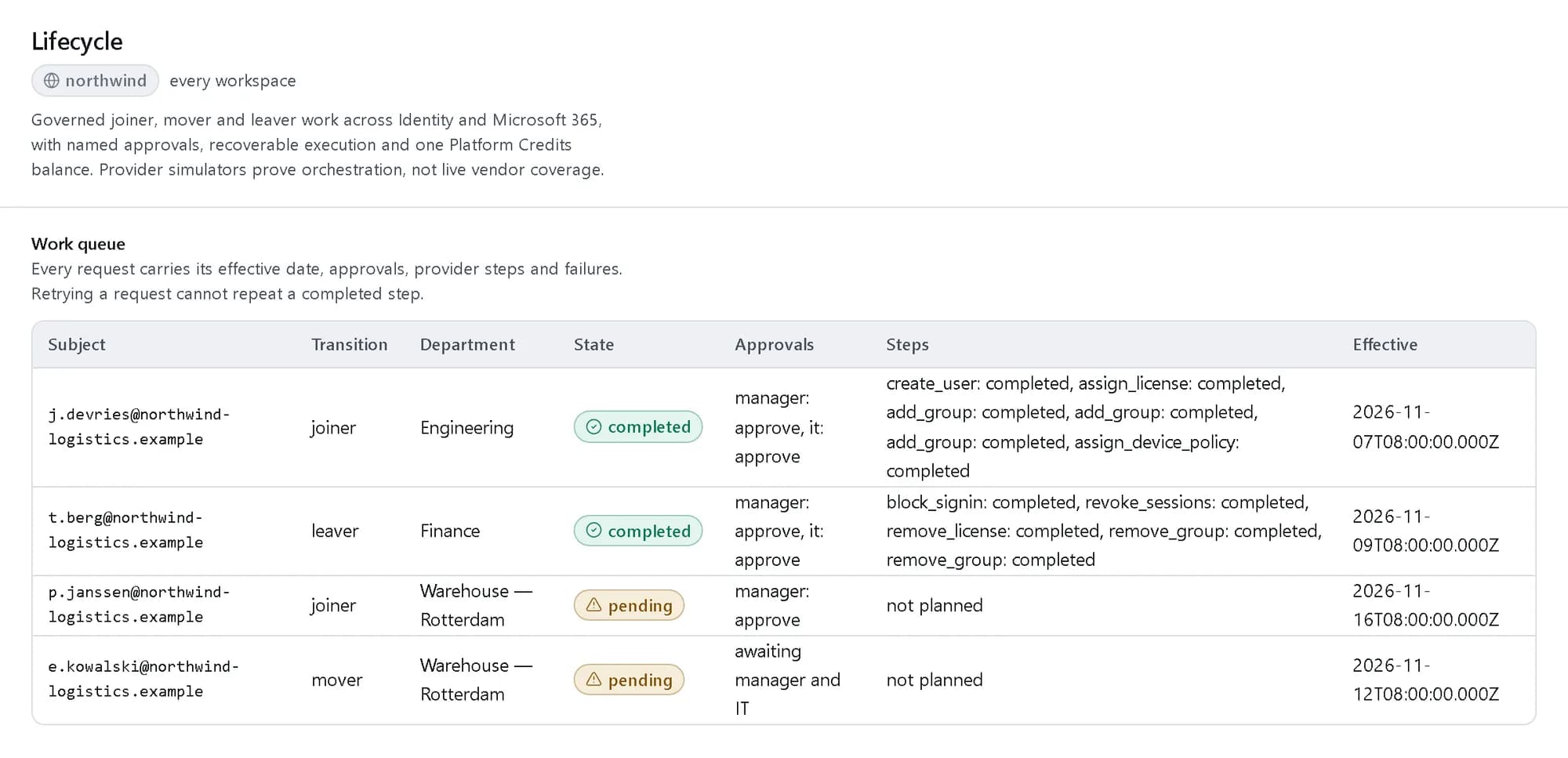
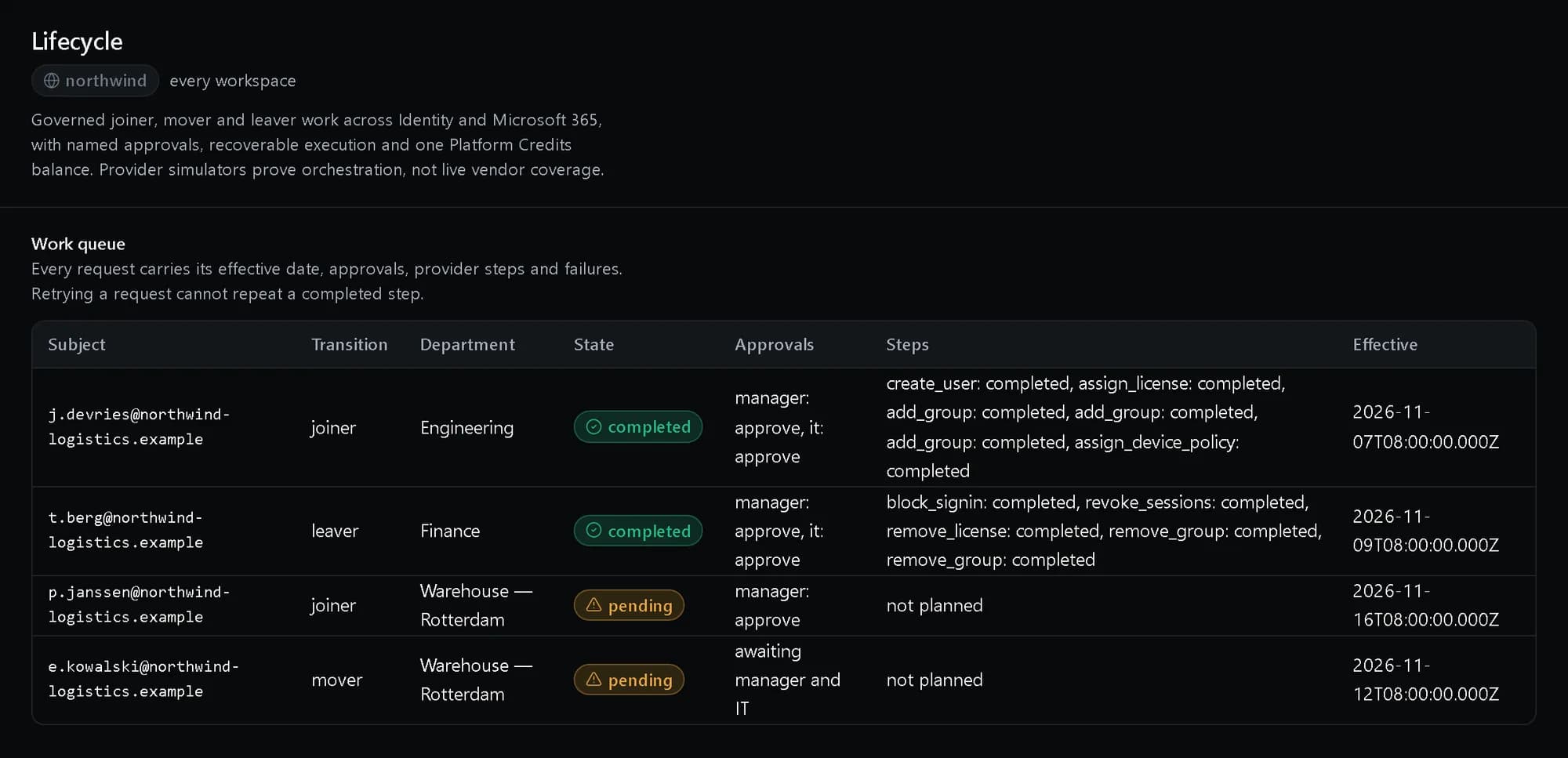
One work queue
Every joiner, mover and leaver with its effective date, who approved it and each step it ran.
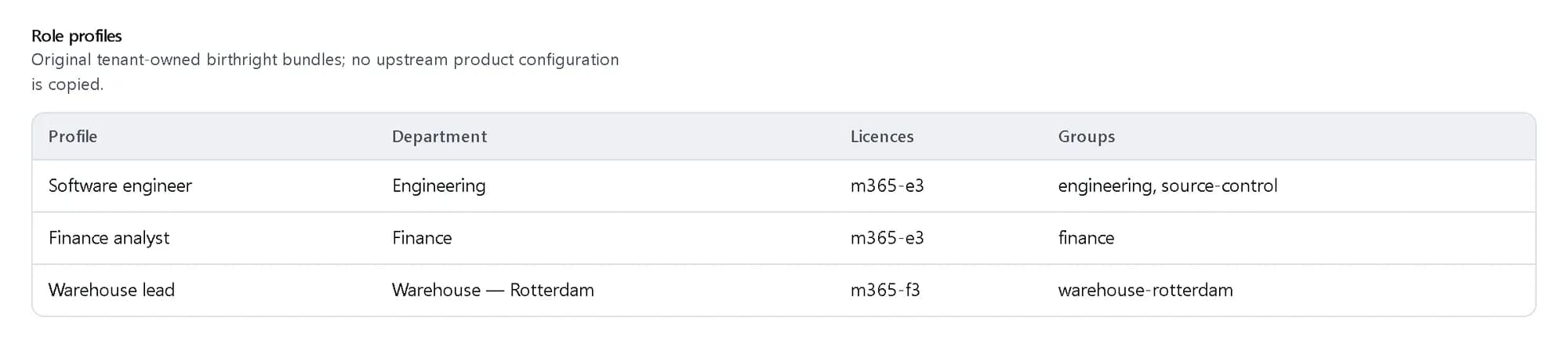
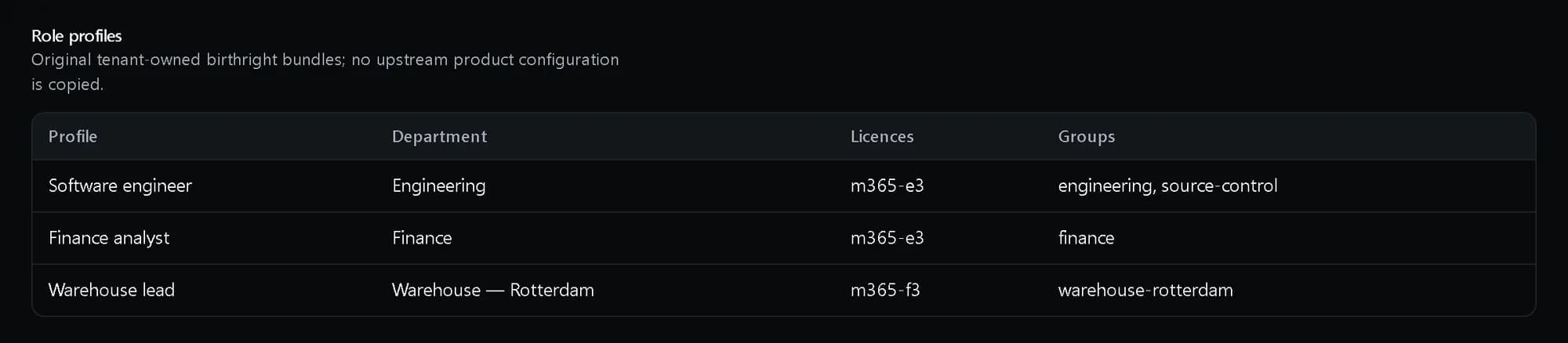
Role profiles
The licences, groups, teams, applications and device policy a kind of employee gets, defined once.
How it fits together
What happens between your request and a running resource.
A request names the person, the effective date and the role profile. The manager and IT approve in order. Only then does the platform run each provider step, record it, and hand the first credential over once.
- Lifecycle request: joiner · mover · leaver (You)
- Manager, then IT: ordered approvals (You)
- Execution: one record per step (The platform)
- Credential handoff: read once (The platform)
- Directory: users and groups (Where access lives)
- Office suite: licences and teams (Where access lives)
- Lifecycle request to Manager, then IT
- Manager, then IT to Execution: all approved
- Execution to Directory
- Execution to Office suite: provider steps
- Execution to Credential handoff
Who it is for
The teams and situations this product was built for.
HR and IT together
A joiner starts Monday and needs everything ready — accounts, access, credentials.
The role profile decides the access, the approvals run in order, and the handover happens once, on the effective date.
Security teams
A leaver’s access must end completely and provably, the day they leave.
One approval executes the revocation sequence and leaves an evidence record behind.
Growing companies
People change teams constantly, and access quietly piles up.
Mover requests adjust access as a tracked change with history, so entitlement follows the role, not the person’s memory.
What it does
The core capabilities, live in the product today.
Structured joiner, mover and leaver requests
Every change starts as a tracked request with an effective date, an owner and a full history — not an untracked instruction in an inbox.
A request is raised with the person, the role, the effective date and the owner, and it keeps its full history from that moment. Nothing about someone’s access changes outside one, so “how did they get this?” always has an answer.
Role profiles and ordered approvals
Reusable entitlement bundles define what a role gets. Manager and IT approvals happen in order, and nothing executes until every required approval is in.
Define the bundle once — the access a support engineer gets, the access a finance lead gets — and every request reuses it. Manager and IT approve in a defined order, and execution waits until every required approval has landed.
Safe retries and explicit rollback
Every step of execution is recorded. A partial failure can be retried safely, and each completed step names the rollback that undoes it.
Execution records every step as it runs. A step that fails retries safely where it stopped, and each completed step names the rollback that undoes it — a partial change never becomes permanent drift nobody can explain.
Single-read credential handoff
New credentials are handed over once and expire — the platform keeps a fingerprint of the handoff, never the reusable secret.
The new joiner’s credentials are shown once, to the person they belong to, and then they expire. The platform keeps a fingerprint proving the handoff happened — never the reusable secret itself.
The ideas behind it
The words this page uses, explained once.
- Role profile
- A named bundle of licences, groups, teams, applications and device policy for one kind of employee. A request points at a profile instead of listing access by hand.
- Joiner, mover, leaver
- The three changes a person’s access goes through. Each is a request with an owner, an effective date and a history that cannot be edited.
- Compensation
- The explicit undo for a step that completed before a later one failed. It is run on purpose and recorded, never presented as a successful run.
In depth
The detail an evaluation asks for.
Execution you can retry
Each provider step is recorded as it runs. Retrying a request skips the steps that already completed, so running it twice never creates a second account or assigns a licence twice.
HR as the source of truth
A full read from the HR system flags people who exist in the directory but not in HR as orphans for a person to decide on. Nobody is suspended automatically on a mismatch.
Licence insight
Lifecycle prices its own execution history against your licence rate card and names the reclaim candidates: suspended, deprovisioned, orphaned and 90 days idle.
For service providers
A client grants its service provider a time-boxed window, eight hours at most, that the client can see and revoke. No query ever crosses from one company into another.
How it works
- Console
Model your roles
Role profiles bundle the access each kind of employee gets — defined once, reused for every request.
- Console
Raise a request
A joiner, mover or leaver request carries an effective date and an owner from the moment it is raised.
- Console
Approvals run in order
Manager and IT approve in a defined order; nothing executes until every required approval is in.
- Audit trail
Watch it execute
Every step runs, retries safely if it fails, and leaves evidence — with new credentials handed over exactly once.
In code
The same task in the CLI and both SDKs. Every call shown exists in the API.
prx CLI
Open a joiner request, record both approvals and run it
prx identity lifecycle create-lifecycle-requests --body '{"kind":"joiner","subject":"j.devries@northwind-logistics.example","manager":"s.iyer","it_approver":"k.mensah","effective_at":"2026-11-16T08:00:00Z","department":"Engineering","role_profile":"prx:northwind:iam:_:role_profile:058334c5-b999-44c7-96f9-43f7d9e6891b"}'prx identity lifecycle decide-lifecycle-requests "$REQUEST" --body '{"capacity":"manager","approver":"s.iyer","decision":"approve"}'prx identity lifecycle decide-lifecycle-requests "$REQUEST" --body '{"capacity":"it","approver":"k.mensah","decision":"approve"}'prx identity lifecycle execute-lifecycle-requests "$REQUEST"TypeScript SDK
Open a joiner request, record both approvals and run it
const request = await client.identity.lifecycle.createLifecycleRequests({ kind: 'joiner', subject: 'j.devries@northwind-logistics.example', manager: 's.iyer', it_approver: 'k.mensah', effective_at: '2026-11-16T08:00:00Z', department: 'Engineering', role_profile: engineerProfile.urn });const id = request.urn.split(':').pop();await client.identity.lifecycle.decideLifecycleRequests(id, { capacity: 'manager', approver: 's.iyer', decision: 'approve' });await client.identity.lifecycle.decideLifecycleRequests(id, { capacity: 'it', approver: 'k.mensah', decision: 'approve' });const { steps } = await client.identity.lifecycle.executeLifecycleRequests(id);Python SDK
Open a joiner request, record both approvals and run it
request = client.identity.lifecycle.create_lifecycle_requests({"kind": "joiner", "subject": "j.devries@northwind-logistics.example", "manager": "s.iyer", "it_approver": "k.mensah", "effective_at": "2026-11-16T08:00:00Z", "department": "Engineering", "role_profile": engineer_profile["urn"]})request_id = request["urn"].split(":")[-1]client.identity.lifecycle.decide_lifecycle_requests(request_id, {"capacity": "manager", "approver": "s.iyer", "decision": "approve"})client.identity.lifecycle.decide_lifecycle_requests(request_id, {"capacity": "it", "approver": "k.mensah", "decision": "approve"})steps = client.identity.lifecycle.execute_lifecycle_requests(request_id)["steps"]The difference
The way this job usually goes, and the way it goes here.
The usual way
With ProjectX
A joiner ticket, a week of follow-ups, and access copied from whoever seems similar.
A role profile decides the access before day one; approvals run in order and execution is automatic.
Offboarding is a spreadsheet and a hope that every admin sees it.
One approval executes the revocation sequence and leaves the evidence record behind.
“Who approved this access?” is an investigation.
Every request carries owner, effective date, ordered approvals and execution history — the record is the evidence.
Works with your tools
Every surface below drives the same product — script it, click it, or hand it to your existing tooling.
- Console
- API
- Audit trail
Questions, answered
How does a new joiner get access?
You define role profiles once — the bundle of access each kind of employee gets. A joiner request names the profile and the effective date, the manager and IT approvals happen in order, and execution runs automatically. Credentials are handed over once, single-read.
What happens when someone leaves?
A leaver request executes the revocation steps in order and records each one. Every completed step names its rollback, and the finished request is the evidence the access is gone.
Can we prove this to an auditor?
Yes. Every request carries its owner, effective date, ordered approvals and full execution history — the record is the evidence.
How is it priced?
At published usage rates in Platform Credits — you pay for what you use, on the same invoice as the rest of the platform. The rates are on the pricing page.
Products it works with
Same platform, same console, same invoice.
Start with ProjectX today.
Create a company in minutes and add this product to your invoice at the published rate.