Video Intelligence
Ask a camera a question in a sentence.
Natural-language search over thousands of hours of archive, live alerts on what matters, and cases with a chain of custody — on the cameras you already own, with privacy defaults you do not have to remember.
What it does
The core capabilities, live in the product today.
Purpose-limited archive access
Searching beyond a configurable window requires a stated purpose, logged and reportable. Enforced in software, not asked for in a policy document.
The window is a control, not a convention: a search beyond it names its purpose, and that purpose is logged and reportable. The privacy posture holds because the software enforces it, not because everyone remembered.
Ingest from the cameras you have
RTSP and ONVIF, with recording that keeps working when the uplink does not.
Standard protocols, no rip-and-replace: the fleet you already own is the fleet you keep. A site that loses its uplink keeps recording and reconciles when the connection returns.
How it works
- Console
Connect the cameras you own
Standard RTSP and ONVIF ingest — no rip-and-replace — with recording that keeps working when the uplink does not.
- Ask
Ask in plain language
Search thousands of hours of archive with a sentence, and see the reasoning behind every answer you get.
- Investigator console
Act with a chain of custody
Alerts on what matters, cases and evidence exports — and archive access beyond a set window needs a stated, logged purpose.
The products in this pillar
Each one with its own page, its own published prices, and the same invoice.
See it in the console
Real screens from the products in this pillar, shown with demo data.
Video Search & Alerts: From a sentence to a result
A search typed with its purpose, read into filters and answered with the reason it matched.
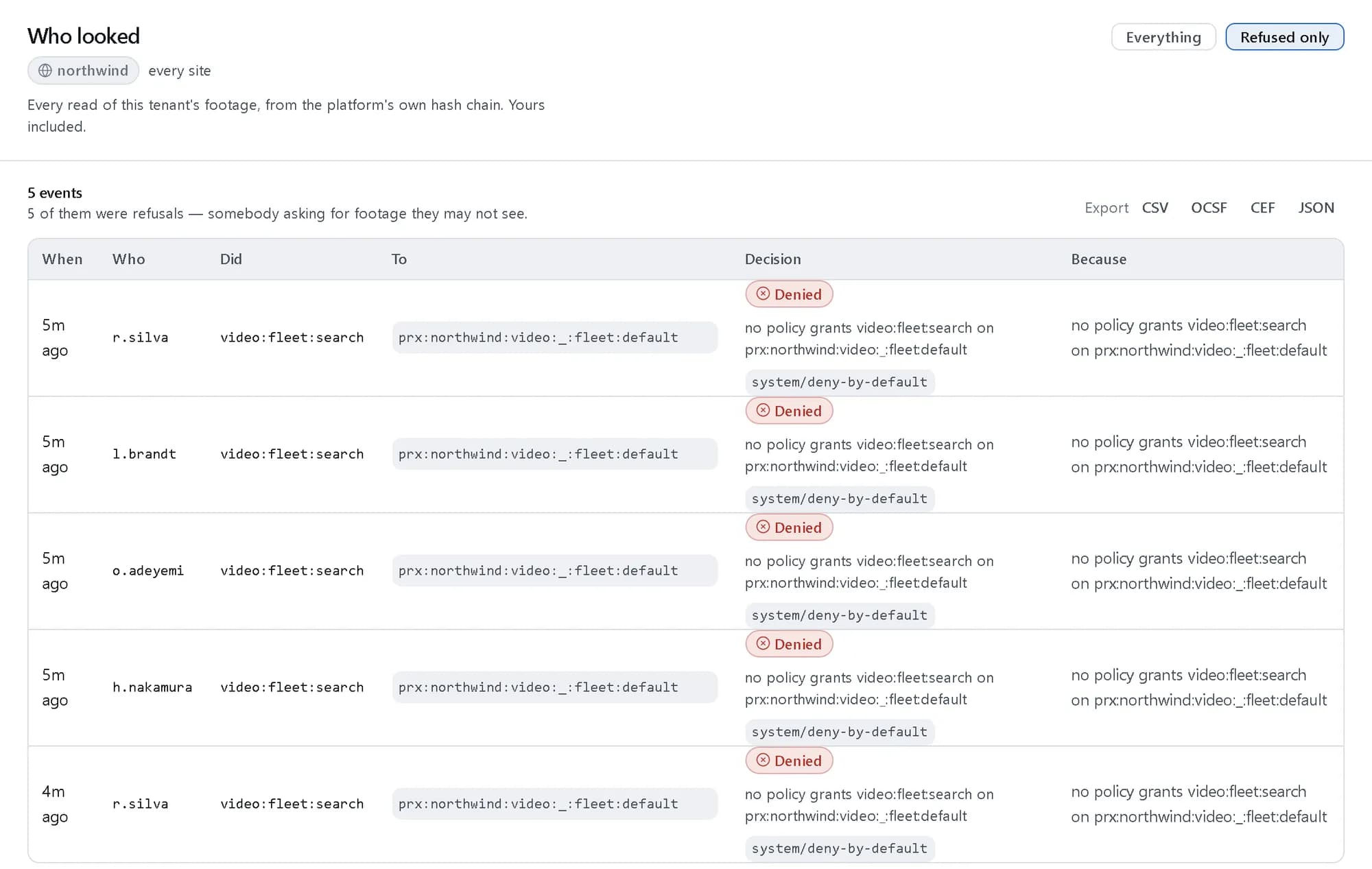
Investigations: Who looked
Every read of the tenant’s footage, here filtered to the searches policy refused.
Jobs it does
Use cases that run through this pillar, end to end.
The ideas behind it
- One decision point for every permissionEvery service asks the same policy decision point whether an action is allowed, and every answer carries its reason. There is no second, quieter path to the data.Read the explainer
- A tamper-evident auditEvery allow and every deny, from every pillar, lands in one hash-chained record that can be verified, exported and kept under legal hold.Read the explainer
- Searching video in plain languageA sentence is read into objects, attributes, places and times. Only what the parser is sure of becomes a filter; the rest ranks results, and every result says why it matched.Read the explainer
Where the work happens
Investigator console
The clip player, camera fleet and search surface, with the plan behind every answer shown beside it.
Questions, answered
Do we need new cameras?
No. Ingest is standard RTSP and ONVIF from the cameras you already own, and recording keeps working when the uplink does not.
Who can search old footage?
Searching beyond a configurable window requires a stated purpose, logged and reportable — enforced in software, not asked for in a policy document.
How do we trust an answer?
Every answer shows the plan behind it — what was searched, what was found, and what was withheld — so a conclusion is traceable rather than asserted.
What does it cost?
Camera and processing usage at published rates on the pricing page, on the same invoice as the rest of the platform.
See it running.
Create a company and try it with your own data, or talk to us about your setup.