Investigations
Cases with evidence that holds up, and a record of everyone who looked.
Open a case from an alert, a search result or by hand. Attach clips, frames, notes and records from identity, access and cloud, keep the footage under legal hold, and export a tamper-evident package. Every view, export and search is written to an audit a tenant administrator cannot switch off.
The advantages
The outcomes this product is built around.
Evidence that proves itself
Evidence is hashed on the way into an immutable vault, and an export carries a manifest anyone can verify.
One case across every system
Footage sits next to the identity events, access logs and cloud telemetry that explain it, on one timeline across cameras and sites.
Nothing deleted while it matters
A legal hold suspends retention deletion for everything in the case until it is lifted. Footage deleted on schedule leaves a deletion certificate behind.
Every look is recorded
Who viewed, exported or searched, when and why, in audit streams a tenant administrator cannot disable.
- for an untrained tester to produce an evidence package
- < 10 min
- export formats: MP4, MKV, a PDF report and JSON
- 4
- separately reportable audits: search, view, export and face match
- 4
See it in the console
Real screens from the product, not mock-ups.
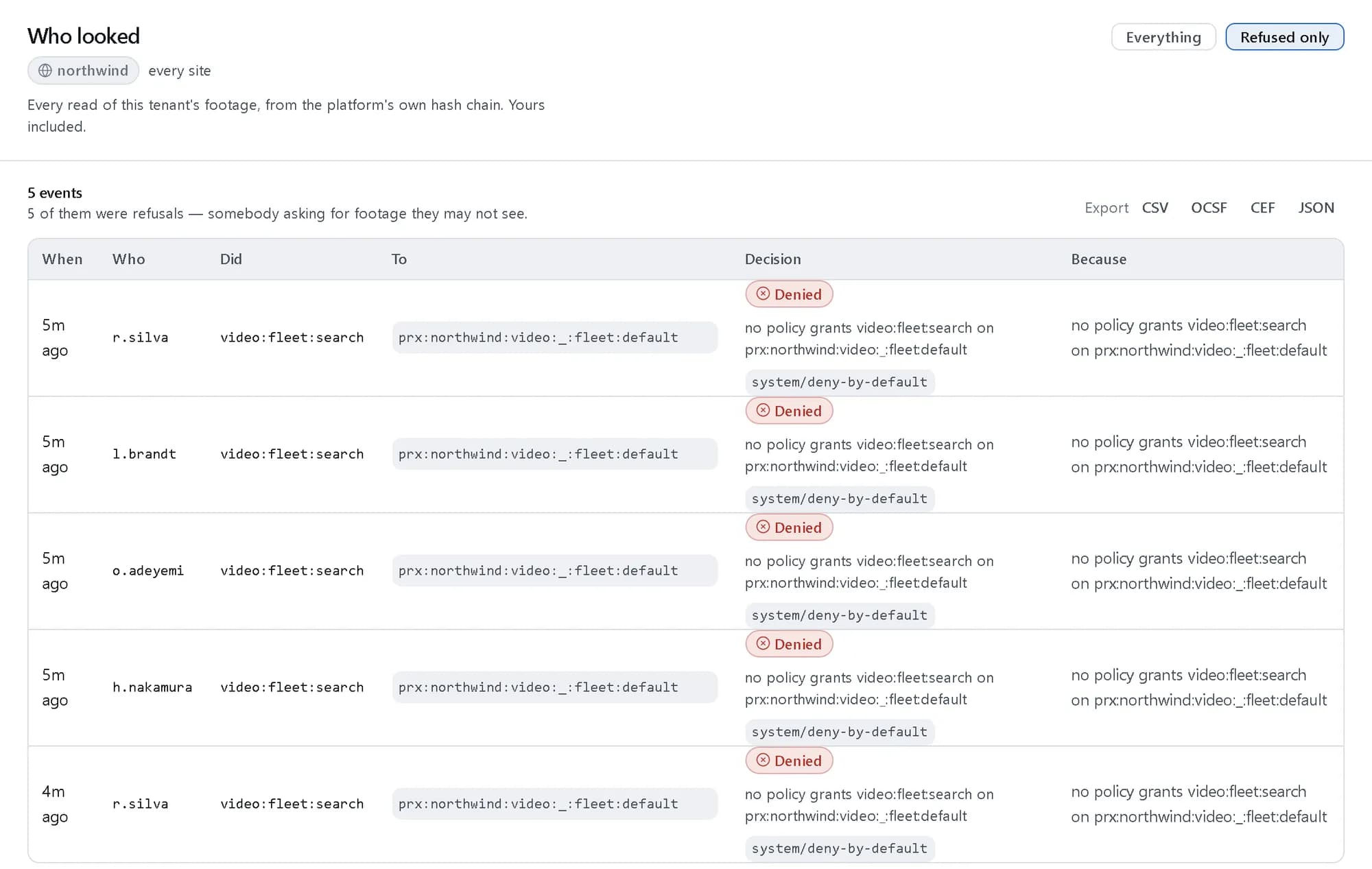
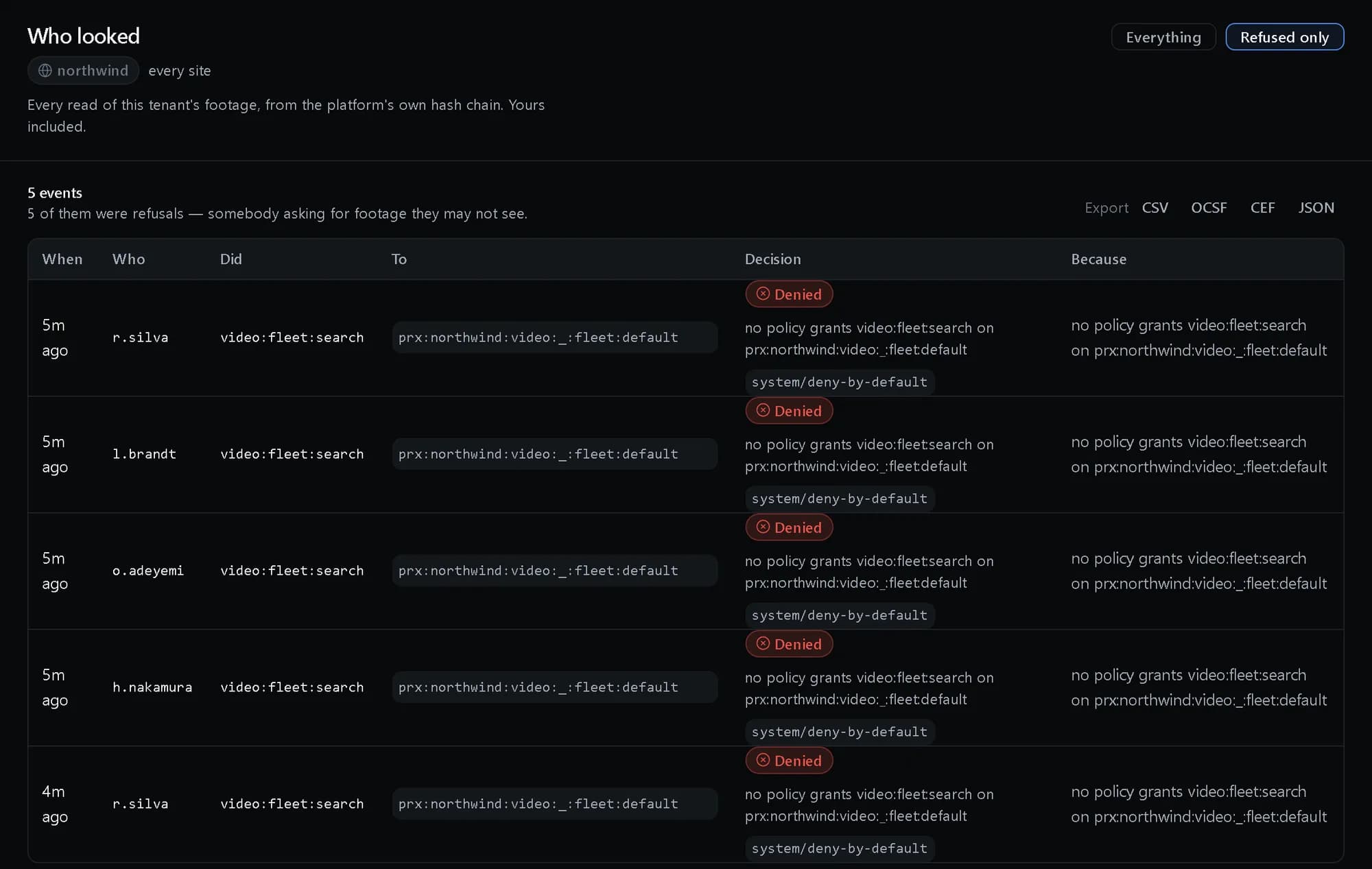
Who looked
Every read of the tenant’s footage, here filtered to the searches policy refused.
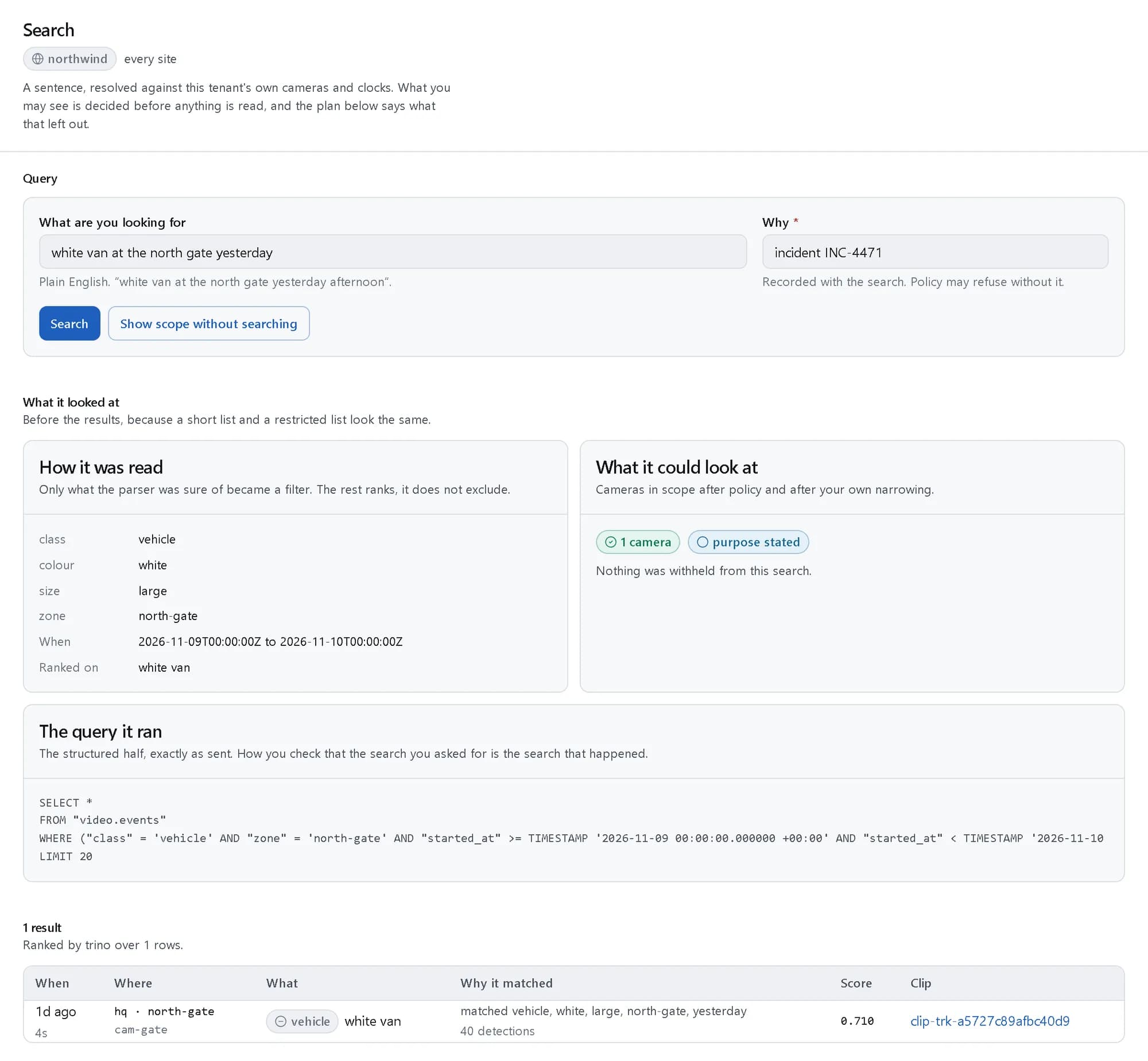
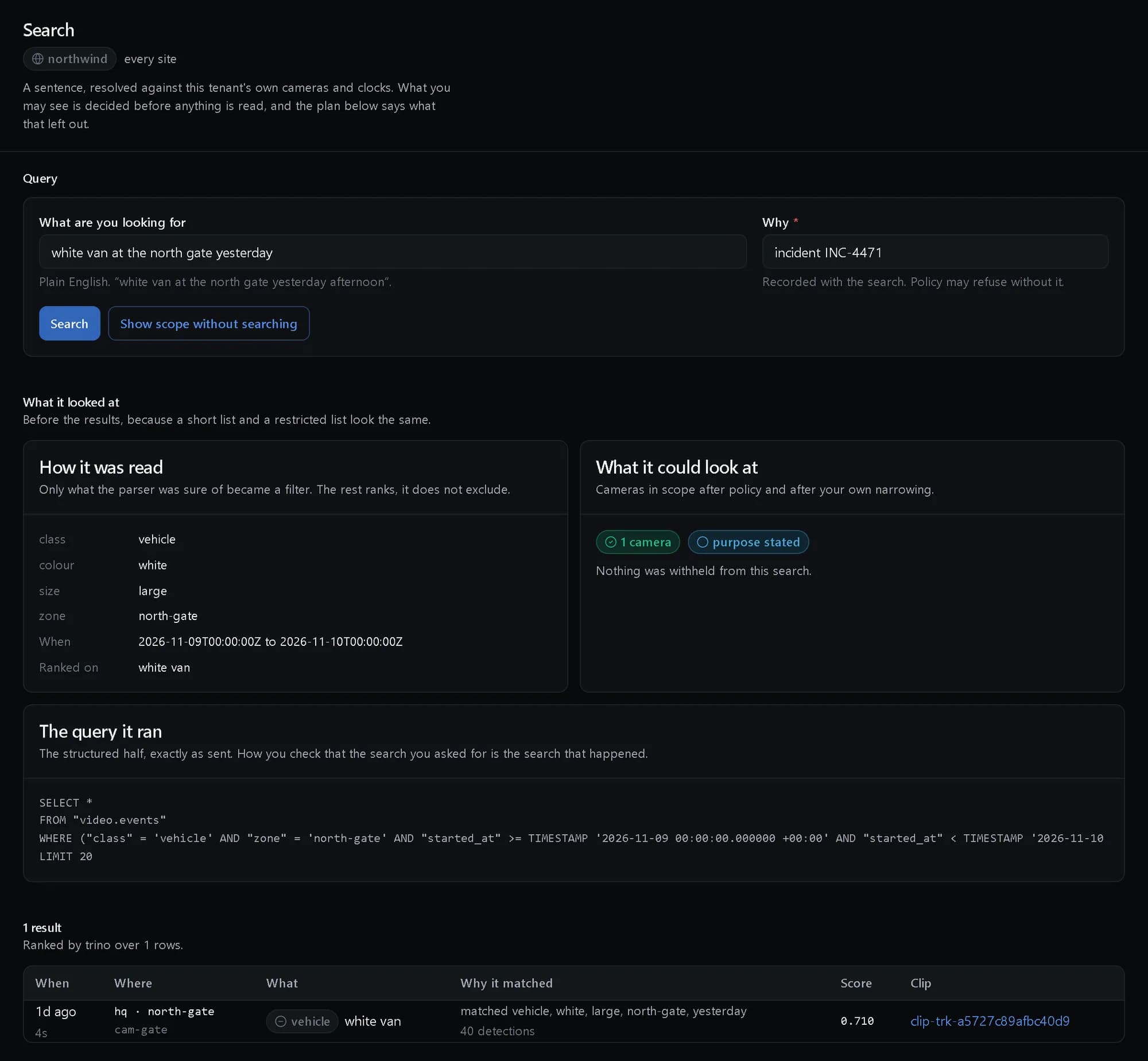
Find the moment
The search that starts most cases, with how it was read and why it matched.
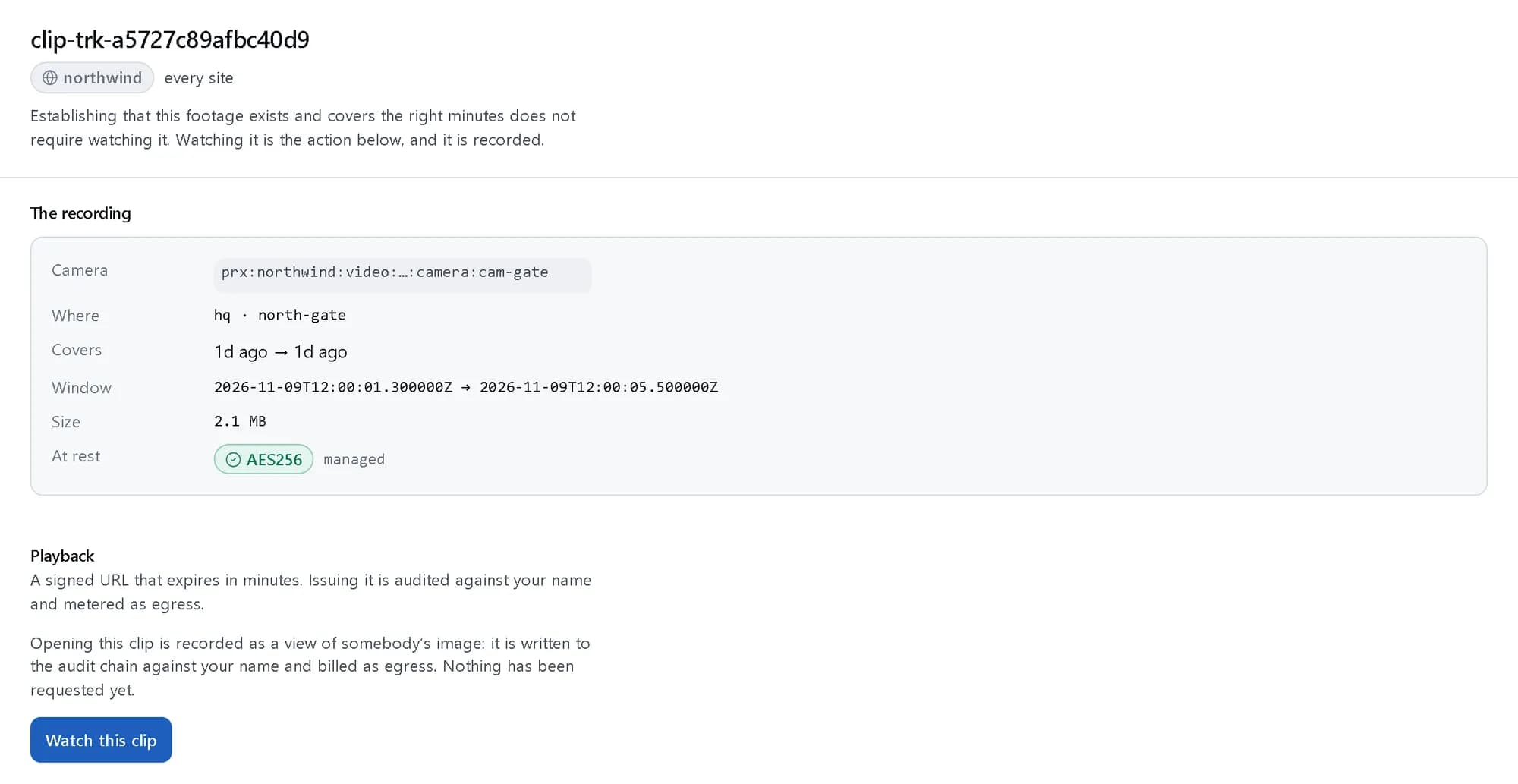
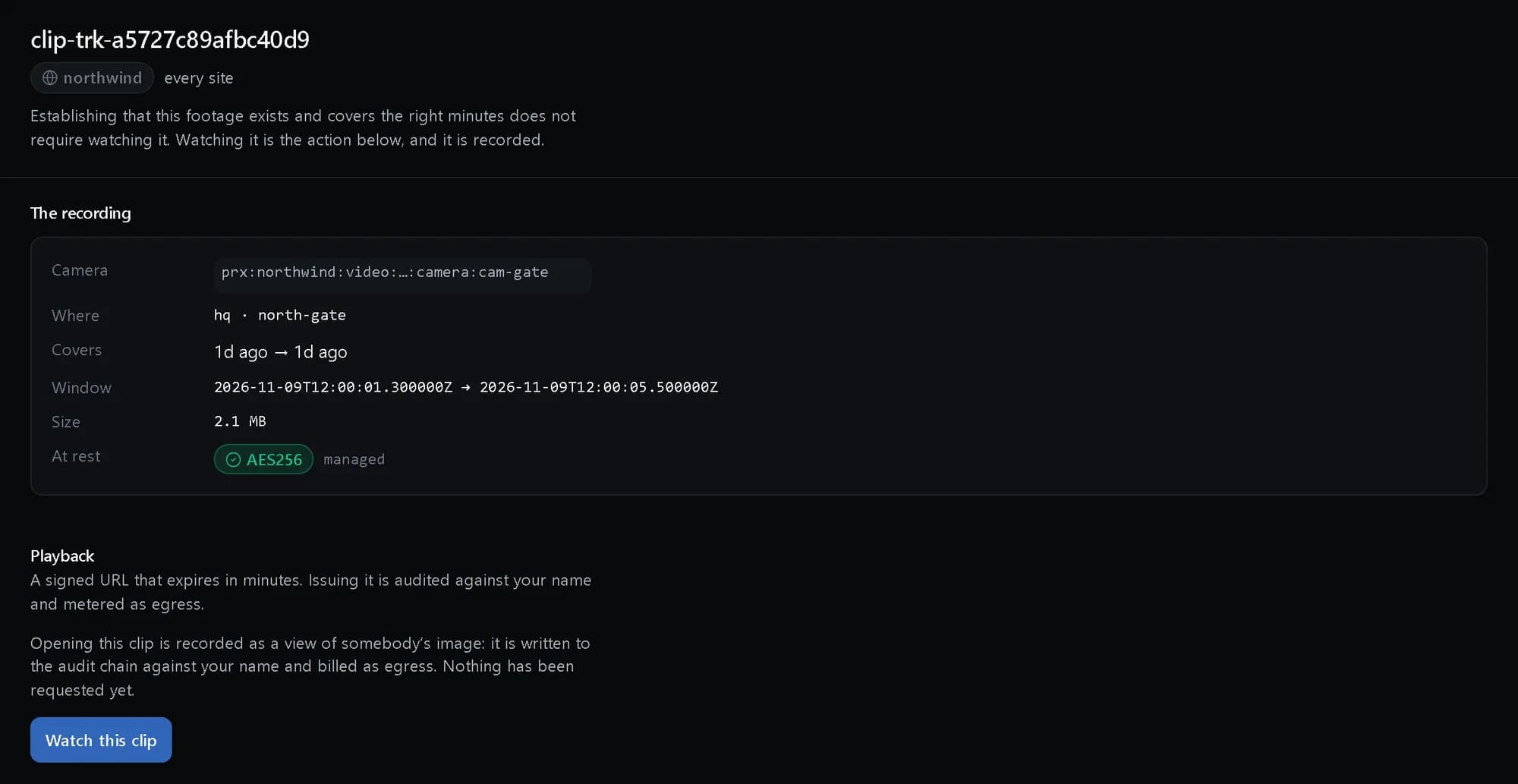
Footage without watching it
A clip’s window, size and encryption, and a playback that is recorded when it happens.
How it fits together
What happens between your request and a running resource.
A case starts from an alert, a search result or a person. Evidence from the cameras and from identity, access and cloud records is attached and hashed into the vault, holds stop deletion, and every view and export is written to the audit before it is allowed to happen.
- Alert, result or person: console · API (Investigator)
- Export package: redacted · manifest (Investigator)
- Case: timeline · comments · hold (The platform)
- Audit streams: search · view · export (The platform)
- Evidence vault: hashed on ingest (Evidence)
- Other records: identity · access · cloud (Evidence)
- Alert, result or person to Case: opens
- Other records to Case: attached
- Case to Evidence vault: hashes
- Case to Export package
- Case to Audit streams: records
Who it is for
The teams and situations this product was built for.
Security investigators
Build a case from footage and records without copying files around.
Cases with evidence, comments and handover, and one timeline across cameras and systems.
Legal and HR
Evidence that will stand up to challenge, kept for as long as the matter runs.
Legal holds, a chain of custody and exports with a verification manifest and redaction applied by default.
Data protection officers
Show a regulator who looked at footage of people, and why.
Separate search, view, export and face-match audit streams, deletion certificates and an exportable DPIA support pack.
What it does
The core capabilities, live in the product today.
Cases from wherever the question starts
Open a case from an alert, a search result or by hand, with a title, window, cameras, subjects, status, assignees and priority.
A case moves from open to investigating to closed. Investigators comment, mention colleagues, hand the case over and link related cases, and case analytics report time to resolution and volume by type and site.
A timeline built from the evidence
Attach clips, frames, exports, files and notes, plus identity events, access logs and cloud telemetry, and see them on one timeline.
The timeline is reconstructed across cameras and sites. Clips are extracted with a configurable buffer before and after the moment, so the context comes with the event.
Vault, hash and chain of custody
Evidence is hashed on ingest into immutable storage, and every view, export, attachment and redaction is recorded with who, when and why.
Clips are kept in an encrypted, segmented store. Footage never passes through the control plane: playback is a signed grant that expires, and issuing it is itself recorded.
Redacted, verifiable exports
Faces, plates and regions are redacted by default on export, in MP4 or MKV with metadata, a PDF report or structured JSON.
Every package carries a verification manifest, so whoever receives it can check nothing was changed. Redaction overrides are explicit and recorded with the export.
Legal hold and retention
Holds suspend deletion for a case; outside a hold, retention deletes footage on schedule and issues a certificate for each deletion.
The certificate names what was deleted, when and under which rule, with a digest over those facts, so the record outlives the footage and cannot be edited afterwards.
Audit you can report on
Search, view, export and face-match audits as separate, reportable streams, and a DPIA support pack you can export.
The audit chain records whether each access was permitted; the streams make it countable, such as how often footage of one camera was viewed this quarter and by whom. Video audit logging cannot be turned off by a tenant administrator.
The ideas behind it
The words this page uses, explained once.
- Chain of custody
- The append-only record of who viewed, exported, attached or redacted each piece of evidence, when and why.
- Legal hold
- An instruction that nothing in a case is deleted, whatever retention says, until the hold is deliberately lifted.
- Verification manifest
- The list of hashes shipped with an export, so whoever receives the package can check that nothing in it was changed.
- Deletion certificate
- The proof, kept after the footage is gone, that it was deleted on schedule under a named rule.
In depth
The detail an evaluation asks for.
The footage path
Clips stay in an encrypted, segmented store. The control plane never carries footage; it issues a signed grant that expires, and the grant is audited against the viewer.
Privacy by default
Masked regions are enforced on the server, never in the browser, and can be permanent, scheduled or lifted for a role with approval. Exports redact faces, plates and regions unless an override is recorded.
Purpose before archive
Searches into the deep archive carry a purpose, and the purpose is logged with the search, so “why was this looked at” has an answer later.
How it works
- Console
Find it
Search the footage in a sentence and open the clip that answers it.
- API
Open the case
Create the case from the result, an alert or by hand, with its cameras and priority.
- SDK
Attach and hold
Add clips, notes and records from other systems, and place a legal hold.
- API
Export and review
Export a redacted, verifiable package, then check who looked in the console�s audit.
In code
The same task in the CLI and both SDKs. Every call shown exists in the API.
prx CLI
Open a case, attach evidence, place a legal hold and read the chain of custody
prx video fleet create-cases --body '{"title":"Entry to the server room without a badge","origin":"manual","cameras":["cam-vault"],"priority":"high"}'prx video fleet evidence-post "$CASE" --body '{"kind":"note","note":"No badge was presented at the server-room door in this window."}'prx video fleet holds "$CASE" --body '{"reason":"Possible disciplinary matter"}'prx video fleet transition "$CASE" --body '{"status":"investigating"}'prx video fleet custody "$CASE"TypeScript SDK
Open a case, attach evidence, place a legal hold and read the chain of custody
const kase = await client.video.fleet.createCases({ title: 'Entry to the server room without a badge', origin: 'manual', cameras: ['cam-vault'], priority: 'high' });await client.video.fleet.evidencePost(kase.case_id, { kind: 'note', note: 'No badge was presented at the server-room door in this window.' });await client.video.fleet.holds(kase.case_id, { reason: 'Possible disciplinary matter' });await client.video.fleet.transition(kase.case_id, { status: 'investigating' });const { custody } = await client.video.fleet.custody(kase.case_id);Python SDK
Open a case, attach evidence, place a legal hold and read the chain of custody
case = client.video.fleet.create_cases({"title": "Entry to the server room without a badge", "origin": "manual", "cameras": ["cam-vault"], "priority": "high"})client.video.fleet.evidence_post(case["case_id"], {"kind": "note", "note": "No badge was presented at the server-room door in this window."})client.video.fleet.holds(case["case_id"], {"reason": "Possible disciplinary matter"})client.video.fleet.transition(case["case_id"], {"status": "investigating"})custody = client.video.fleet.custody(case["case_id"])["custody"]The difference
The way this job usually goes, and the way it goes here.
The usual way
With ProjectX
Footage exported to a shared drive and emailed around.
Evidence hashed into a vault and exported with a manifest anyone can verify.
Video in one system, badge logs and sign-ins in others.
Identity, access and cloud records attached to the same case and timeline.
An audit log the administrator can switch off.
Video audit streams that no tenant administrator can disable.
Works with your tools
Every surface below drives the same product — script it, click it, or hand it to your existing tooling.
- API
- prx CLI
- TypeScript SDK
- Python SDK
- Investigator console: search, footage and audit
Questions, answered
Where do investigators work a case?
Cases are worked through the API, the prx CLI and both SDKs. The investigator console covers the search, the footage and the “Who looked” audit that feed them.
What does an export contain?
MP4 or MKV with metadata, a PDF report or structured JSON, with faces, plates and regions redacted by default and a verification manifest in every package.
Can an administrator turn the audit off?
No. Video audit logging cannot be disabled by a tenant administrator, and search, view, export and face-match audits are each separately reportable.
Does footage pass through your servers?
Footage never traverses the control plane. Playback is a signed, expiring grant to the encrypted clip store, and issuing it is recorded.
How is it priced?
Investigations is part of the video product, billed per camera-hour of footage processed at a published rate in Platform Credits. The rate is on the pricing page.
Products it works with
Same platform, same console, same invoice.
Start with ProjectX today.
Create a company in minutes and add this product to your invoice at the published rate.