Lakehouse
Open Iceberg tables you can always take with you.
Tables in the open Apache Iceberg format on S3-compatible storage, with ACID writes, snapshots, time travel and schema evolution — catalogued, classified and governed by the same policy engine as everything else, and readable by any engine that speaks Iceberg.
The advantages
The outcomes this product is built around.
Leaving is a copy, not a project
Tables are Apache Iceberg on S3-compatible storage behind a standard Iceberg REST catalog, so any engine that speaks the format can read them where they are.
Last Tuesday stays last Tuesday
Every write is a snapshot. Read a table as of a timestamp or a snapshot id, branch it to test a change, and roll back when a load goes wrong.
Change the schema without a rewrite
Add, drop, rename and reorder columns safely, and evolve partitioning without moving the data you already have.
Governed at the column
Columns carry their own classification and description, sensitive ones can be encrypted, and row and column rules are applied when a query is planned, for every engine.
- open table format, readable by any Iceberg engine
- 1
- storage tiers, hot to archive, moved by policy
- 4
- past snapshot readable, by time or id
- Any
See it in the console
Real screens from the product, not mock-ups.
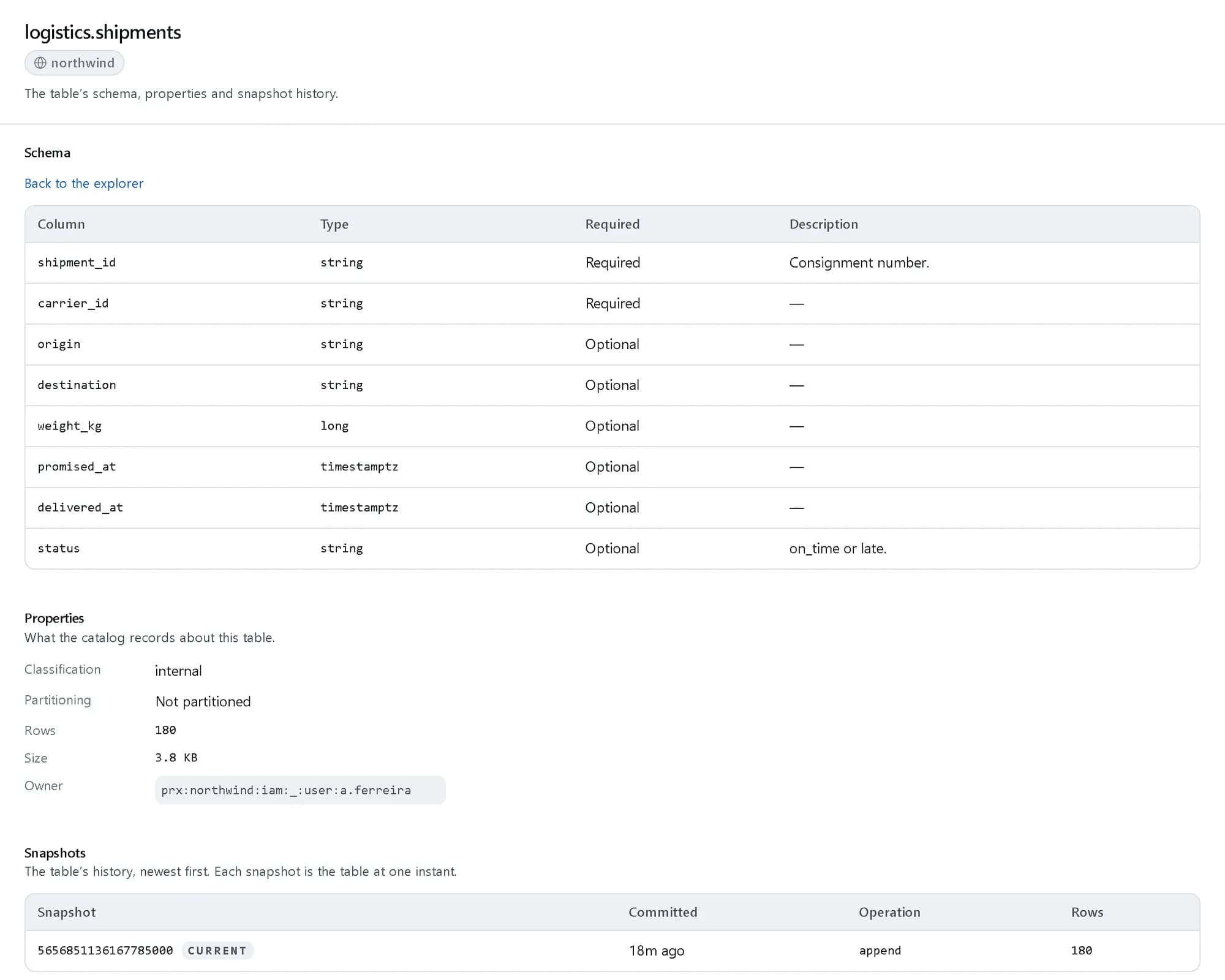
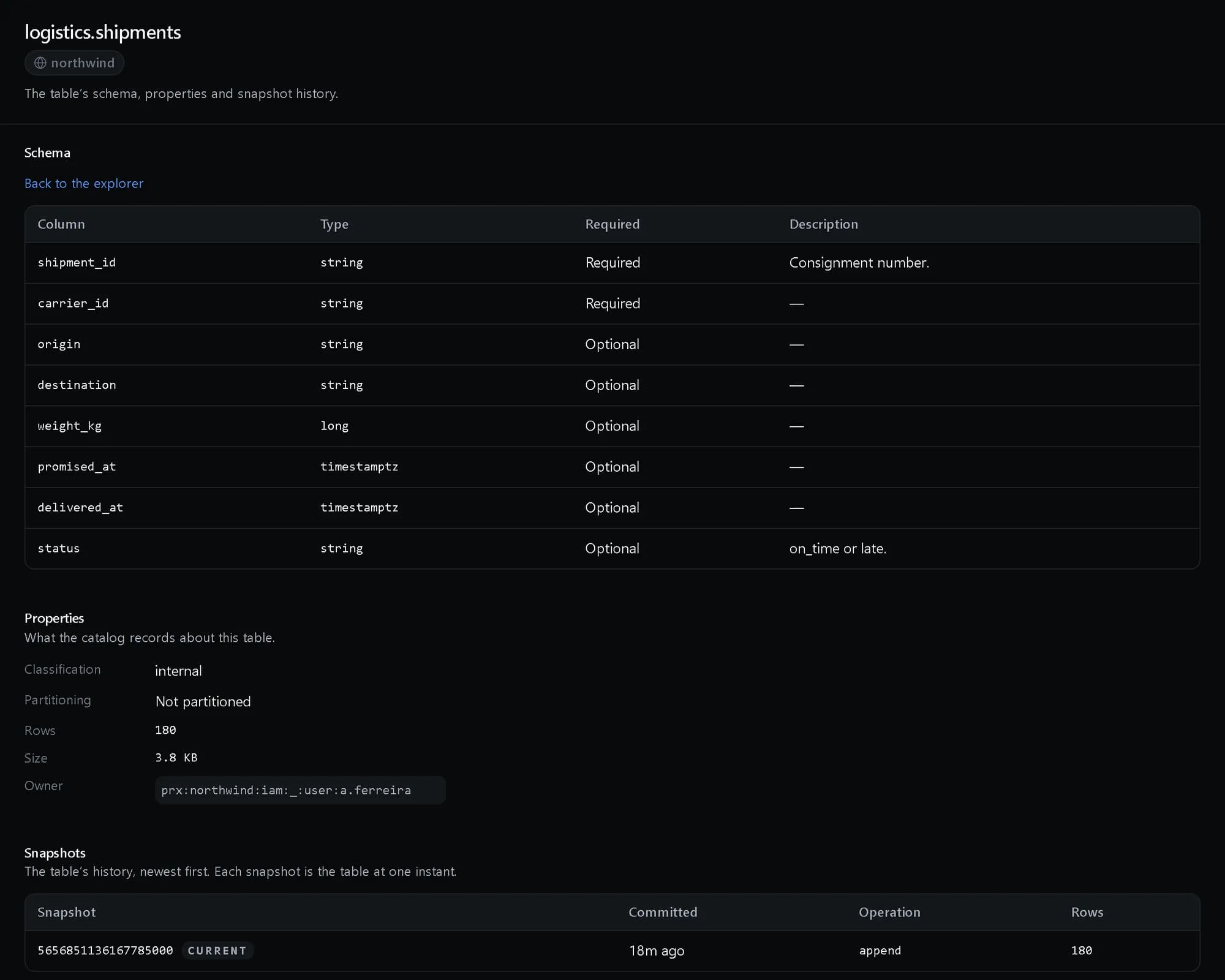
One table, its whole record
Columns and types, classification and size, and the snapshot that is current.
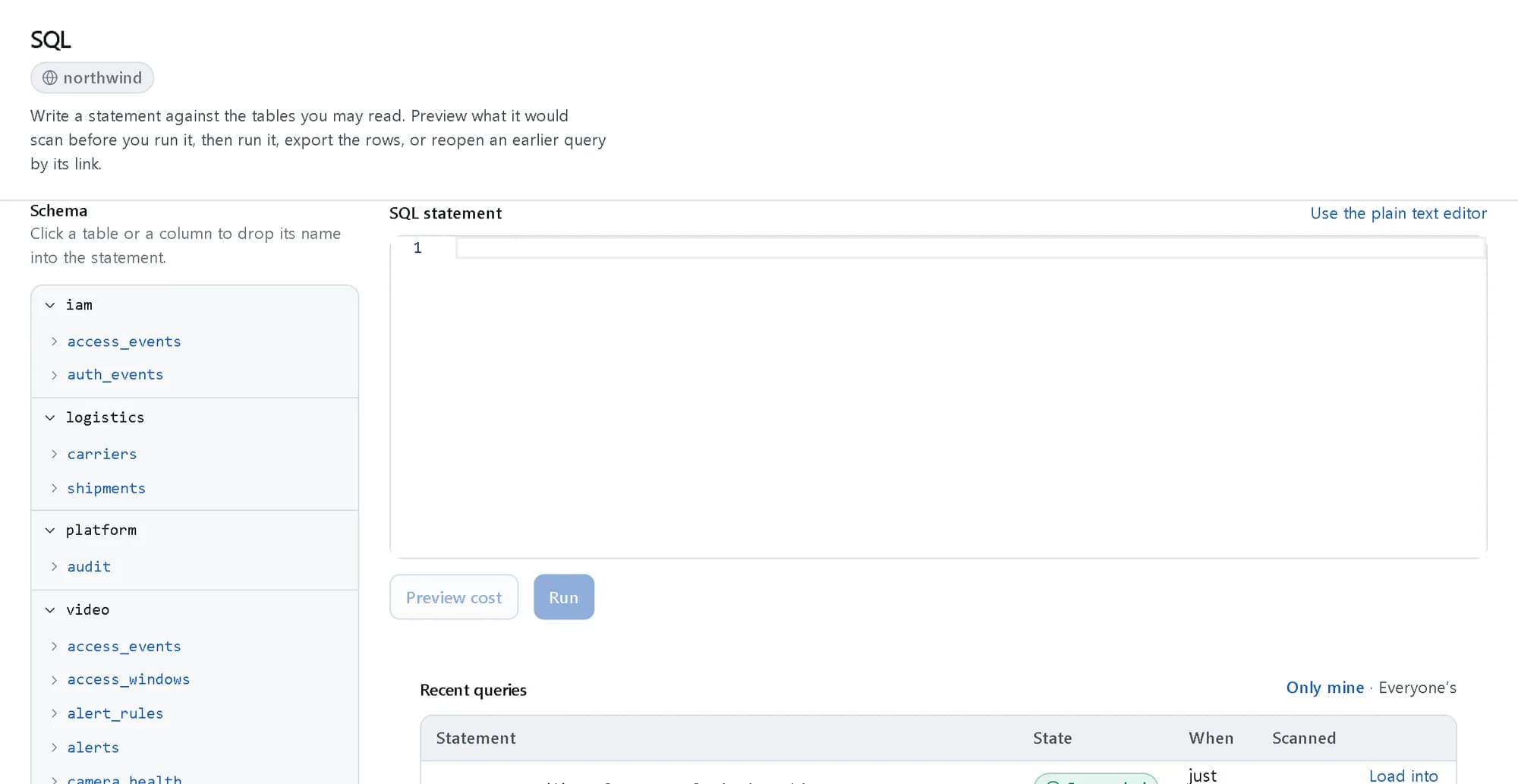
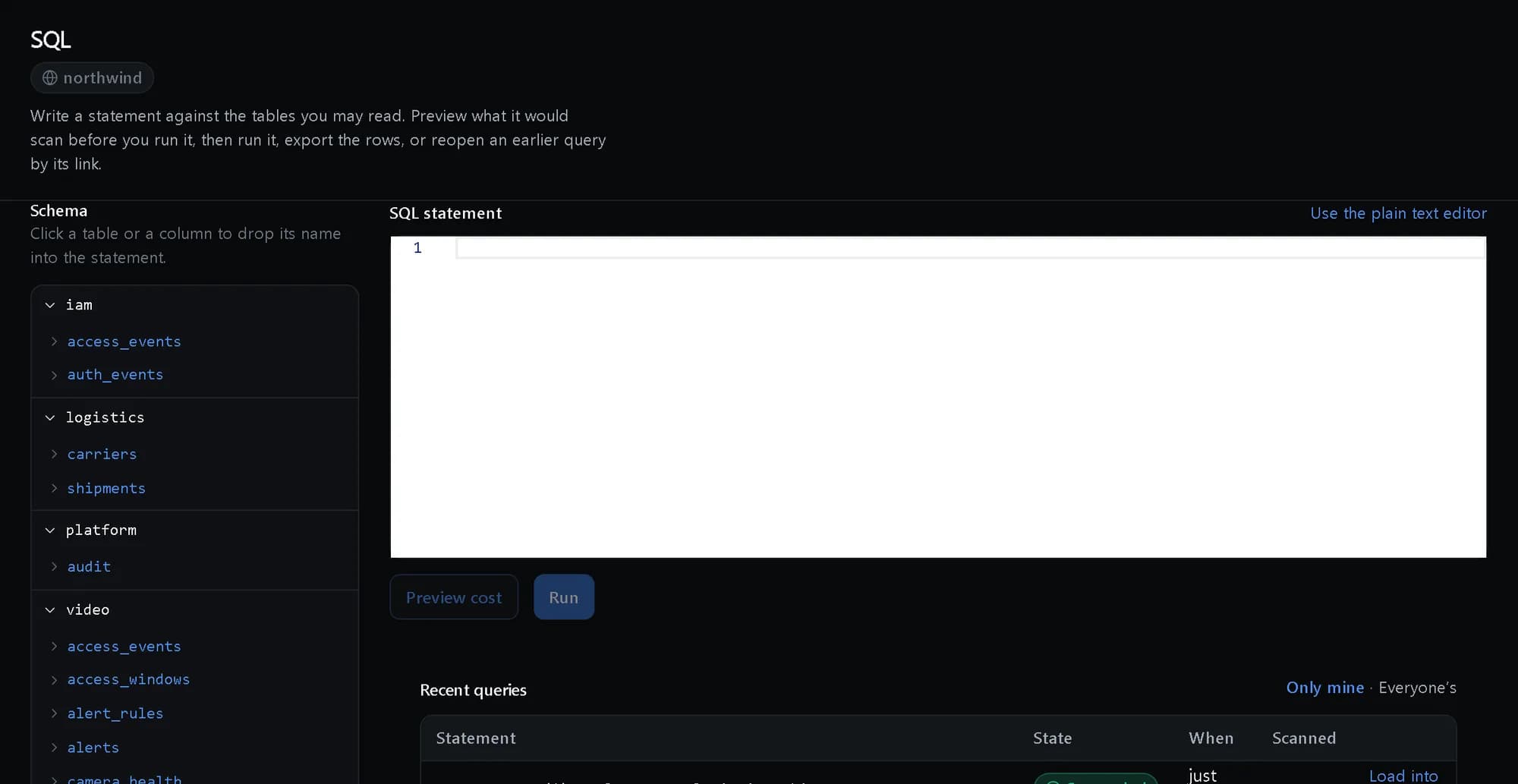
Every namespace you may read
The catalog as you are allowed to see it, beside the SQL editor that queries it.
How it fits together
What happens between your request and a running resource.
Data lands as Iceberg files in S3-compatible storage. The REST catalog records each table and its snapshots, and every engine reads through it with the same row and column rules applied at plan time.
- SQL: Trino (Engines)
- Spark and Python: jobs and notebooks (Engines)
- Iceberg REST catalog: tables · snapshots (The platform)
- Row and column rules: at plan time (The platform)
- Iceberg files: S3-compatible (Storage)
- SQL to Iceberg REST catalog
- Spark and Python to Iceberg REST catalog
- Iceberg REST catalog to Row and column rules
- Iceberg REST catalog to Iceberg files: reads and commits
Who it is for
The teams and situations this product was built for.
Data platform teams
One copy of the data that every engine and team can read, without a proprietary format in the way.
Open Iceberg tables behind a standard REST catalog, with ACID writes and snapshots from day one.
Regulated companies
Sensitive columns, retention obligations and an answer to “who could read this?”.
Column classification, column-level encryption, retention bound to the table and rules enforced at plan time.
Teams leaving a warehouse
A move that does not trade one lock-in for another.
An open format and a standard catalog, with Delta Lake tables readable during the move.
What it does
The core capabilities, live in the product today.
Iceberg tables with ACID writes
Create, alter and describe tables; append, overwrite, upsert, merge and delete as atomic commits.
Every write is one atomic commit that either lands whole or not at all, so a reader never sees half a load. Upserts and merges are first-class operations rather than a delete-and-rewrite you script yourself.
Snapshots, branches and time travel
List and tag snapshots, branch a table, roll back, and read as of any timestamp or snapshot id.
A snapshot is the table at one instant, and every write makes one. Tag the month-end close, branch to try a backfill, and roll back if it is wrong — the history is the table’s, not a backup you hope exists.
Catalog, classification and statistics
Tenant-scoped namespaces, column descriptions and sensitivity, row counts and freshness, and data contracts producers commit to.
The catalog knows what each column means and how sensitive it is, how big and how fresh each table is, and what its producer has promised — so a consumer finds the right table and knows whether to trust it.
Maintenance and tiering handled
Compaction, clustering, snapshot expiry and orphan cleanup, with data moved between hot, warm, cold and archive by policy.
Small files are compacted, old snapshots expired and orphaned files removed on a schedule, and partitions move to cheaper tiers by policy — the housekeeping that otherwise becomes a cost and a performance problem.
The ideas behind it
The words this page uses, explained once.
- Snapshot
- The table at one instant. Every write makes one, so a past state can be read, tagged, branched from or rolled back to. Read more: Snapshot
- Namespace
- A tenant-scoped folder for tables, such as logistics or finance, that grants and placement attach to.
- Data contract
- What a table’s producer commits to — its columns, types and rules — validated on every write and versioned when it changes.
In depth
The detail an evaluation asks for.
Security model
Data is encrypted at rest with per-tenant keys, sensitive columns can be encrypted individually, and row and column rules are applied to the query plan before any engine reads a file.
Retention with legal hold
Retention policies are bound to catalog entries, so a table knows how long it is kept; a legal hold stops deletion until it is lifted.
Lineage as the work happens
Pipelines, syncs and model training record where data came from and where it went, so a figure traces back through every step to its source table.
Sharing as a grant
Share a table with another workspace by grant rather than by export, and revoke it immediately with the revocation on the audit record.
How it works
- Console
Create a namespace and a table
Declare the columns, their types and their sensitivity; the catalog assigns field ids so a rename stays a rename.
- API
Write as atomic commits
Append, upsert or merge rows; every write becomes a snapshot.
- SQL
Query with any engine
SQL, Spark or any Iceberg reader, each held to the same row and column rules.
- Policy
Keep it healthy
Compaction, expiry and tiering run by policy, and lineage records where every table came from.
In code
The same task in the CLI and both SDKs. Every call shown exists in the API.
prx CLI
Create a namespace and a table, then append rows as one commit
prx lakehouse namespace create --body '{"namespace":"logistics"}'prx lakehouse table create --body '{"table":"logistics.shipments","classification":"internal","schema":{"fields":[{"name":"shipment_id","type":"string","required":true},{"name":"carrier_id","type":"string"},{"name":"promised_at","type":"timestamptz"},{"name":"status","type":"string"}],"identity":["shipment_id"]}}'prx lakehouse table rows logistics.shipments --body '{"rows":[{"shipment_id":"NW-410181","carrier_id":"polder","promised_at":"2026-11-10T09:00:00Z","status":"on_time"}]}'TypeScript SDK
Create a namespace and a table, then append rows as one commit
await client.lakehouse.namespace.create({ namespace: 'logistics' });await client.lakehouse.table.create({ table: 'logistics.shipments', classification: 'internal', schema: { fields: [{ name: 'shipment_id', type: 'string', required: true }, { name: 'carrier_id', type: 'string' }, { name: 'promised_at', type: 'timestamptz' }, { name: 'status', type: 'string' }], identity: ['shipment_id'] } });const { snapshot } = await client.lakehouse.table.rows('logistics.shipments', { rows: [{ shipment_id: 'NW-410181', carrier_id: 'polder', promised_at: '2026-11-10T09:00:00Z', status: 'on_time' }] });Python SDK
Create a namespace and a table, then append rows as one commit
client.lakehouse.namespace.create({"namespace": "logistics"})client.lakehouse.table.create({"table": "logistics.shipments", "classification": "internal", "schema": {"fields": [{"name": "shipment_id", "type": "string", "required": True}, {"name": "carrier_id", "type": "string"}, {"name": "promised_at", "type": "timestamptz"}, {"name": "status", "type": "string"}], "identity": ["shipment_id"]}})snapshot = client.lakehouse.table.rows("logistics.shipments", {"rows": [{"shipment_id": "NW-410181", "carrier_id": "polder", "promised_at": "2026-11-10T09:00:00Z", "status": "on_time"}]})["snapshot"]The difference
The way this job usually goes, and the way it goes here.
The usual way
With ProjectX
Data in a proprietary format that only one engine can read.
Open Iceberg tables behind a standard REST catalog, readable by any engine.
A bad load means restoring last night’s backup and losing a day.
Roll the table back to the snapshot before the load, in place.
Sensitive columns protected by a convention someone forgets.
Classification on the column, encryption where needed, and rules enforced when the query is planned.
Works with your tools
Every surface below drives the same product — script it, click it, or hand it to your existing tooling.
- Console
- API
- Iceberg REST catalog
- SQL
- Python SDK
Questions, answered
Can other engines read our tables?
Yes. Tables are Apache Iceberg on S3-compatible storage, served by a standards-compatible Iceberg REST catalog, so engines that speak Iceberg can read them in place.
What happens when a load goes wrong?
Every write is a snapshot. Roll the table back to the snapshot before the bad load, or read it as of an earlier time while you investigate.
How are sensitive columns handled?
Each column carries a classification, sensitive columns can be encrypted, and row and column rules are applied when a query is planned — the same for SQL, notebooks and the API.
Can we bring Delta Lake tables?
Delta Lake tables are readable, so you can query them while you move them to Iceberg.
How is it priced?
Storage by the byte-hour and compute by the second at published rates in Platform Credits, on the same invoice as everything else. The compute rates are on the pricing page.
Products it works with
Same platform, same console, same invoice.
Start with ProjectX today.
Create a company in minutes and add this product to your invoice at the published rate.