Workflows & Agents
Automate the response, and keep every step accountable.
Workflows react to a video alert, a risky sign-in, a cloud anomaly, a data condition, a schedule or a webhook, and act across the platform: notify, open a case or a ticket, run SQL or a pipeline, revoke access, lock a door. Agents do the same under their own identity and budget. Every action is authorized as whoever started it, can be simulated first, and is recorded.
The advantages
The outcomes this product is built around.
See what it would do first
A dry run plans and authorizes every action exactly as a real run would, and takes none of them.
Never more than the person behind it
Each workflow action is authorized as the triggering principal, and an agent acts within the narrower of its own and its user’s permissions.
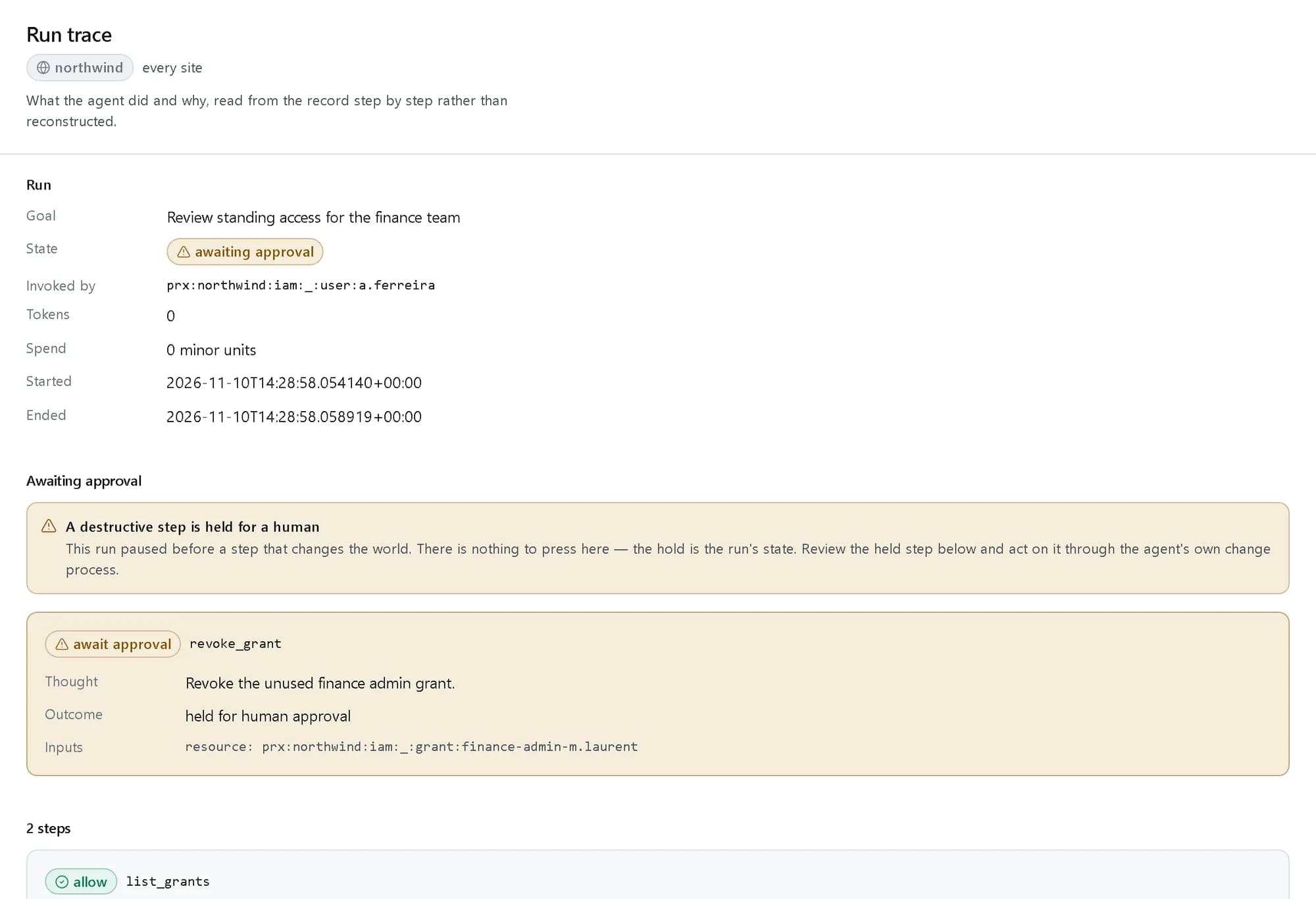
Destructive steps wait for a person
Revoking, deprovisioning and other destructive or costly actions stop for human approval, with a timeout and escalation.
Stopped within seconds
A kill switch per agent, per tenant or globally halts an agent before its next step, within 5 seconds.
- for a kill switch to stop an agent
- < 5 s
- reference agents, from security analyst to offboarding
- 6
- side effects from a dry run
- 0
See it in the console
Real screens from the product, not mock-ups.
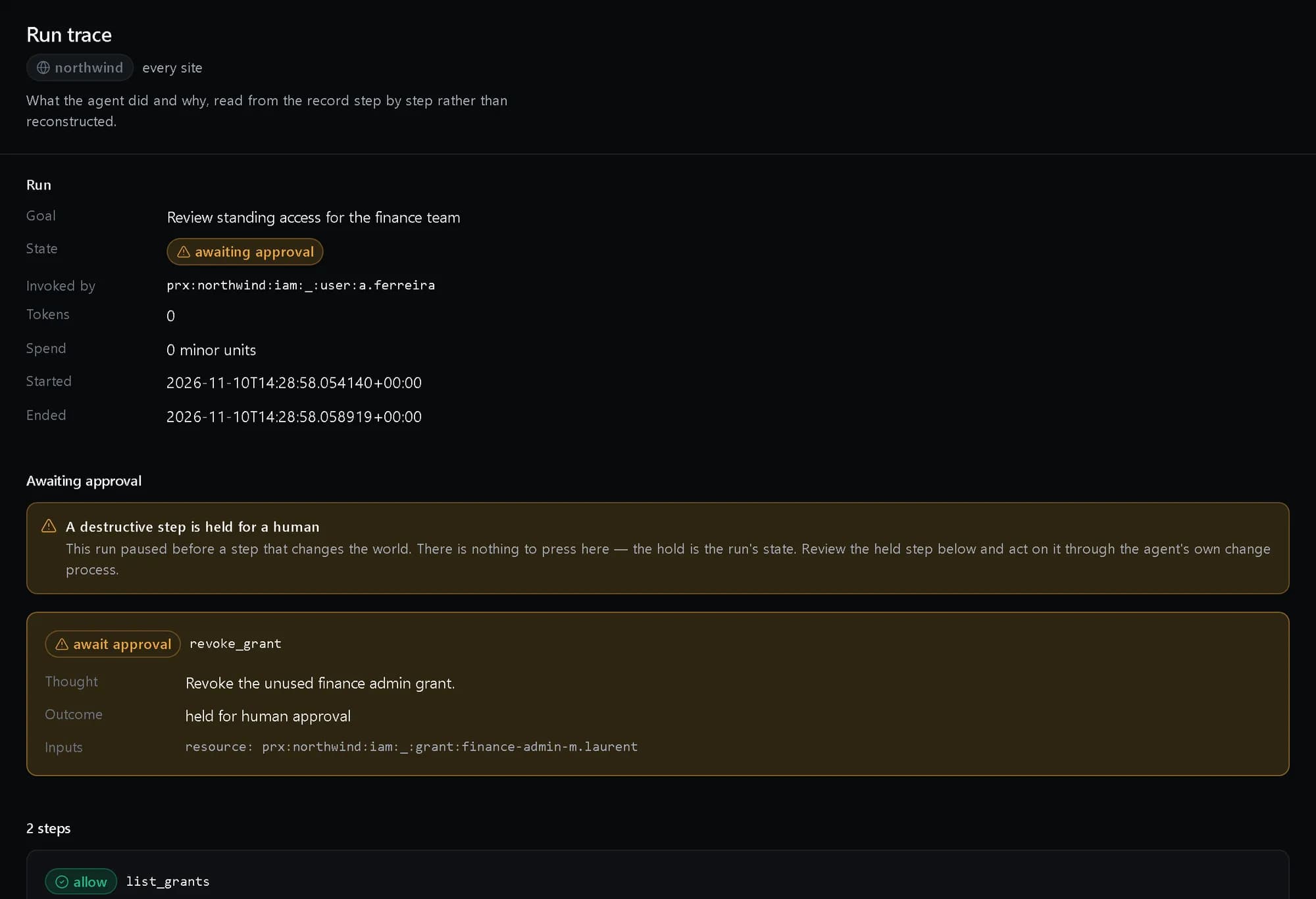
A held step
An access review whose revocation is waiting for a person, with every step recorded.
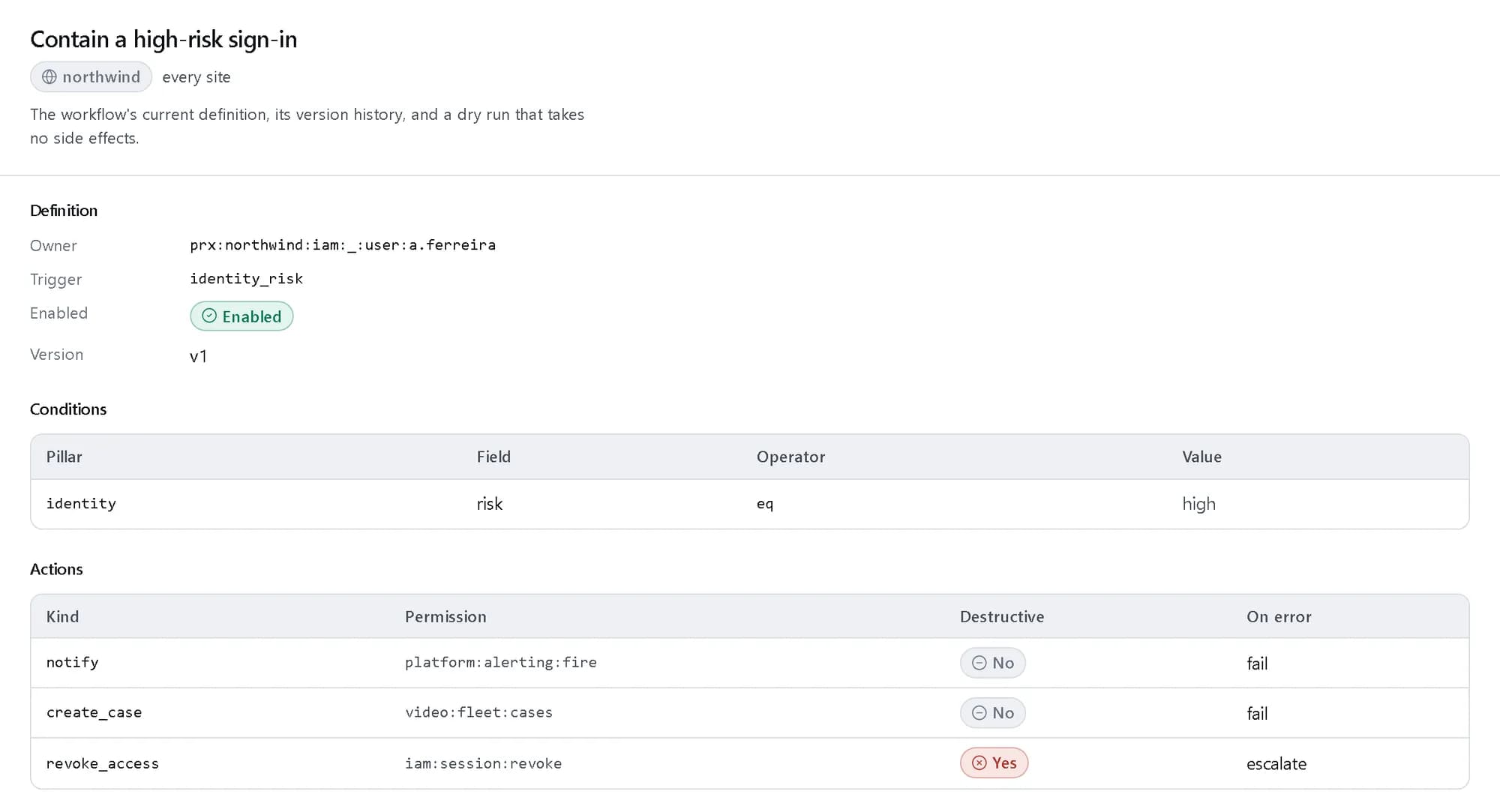
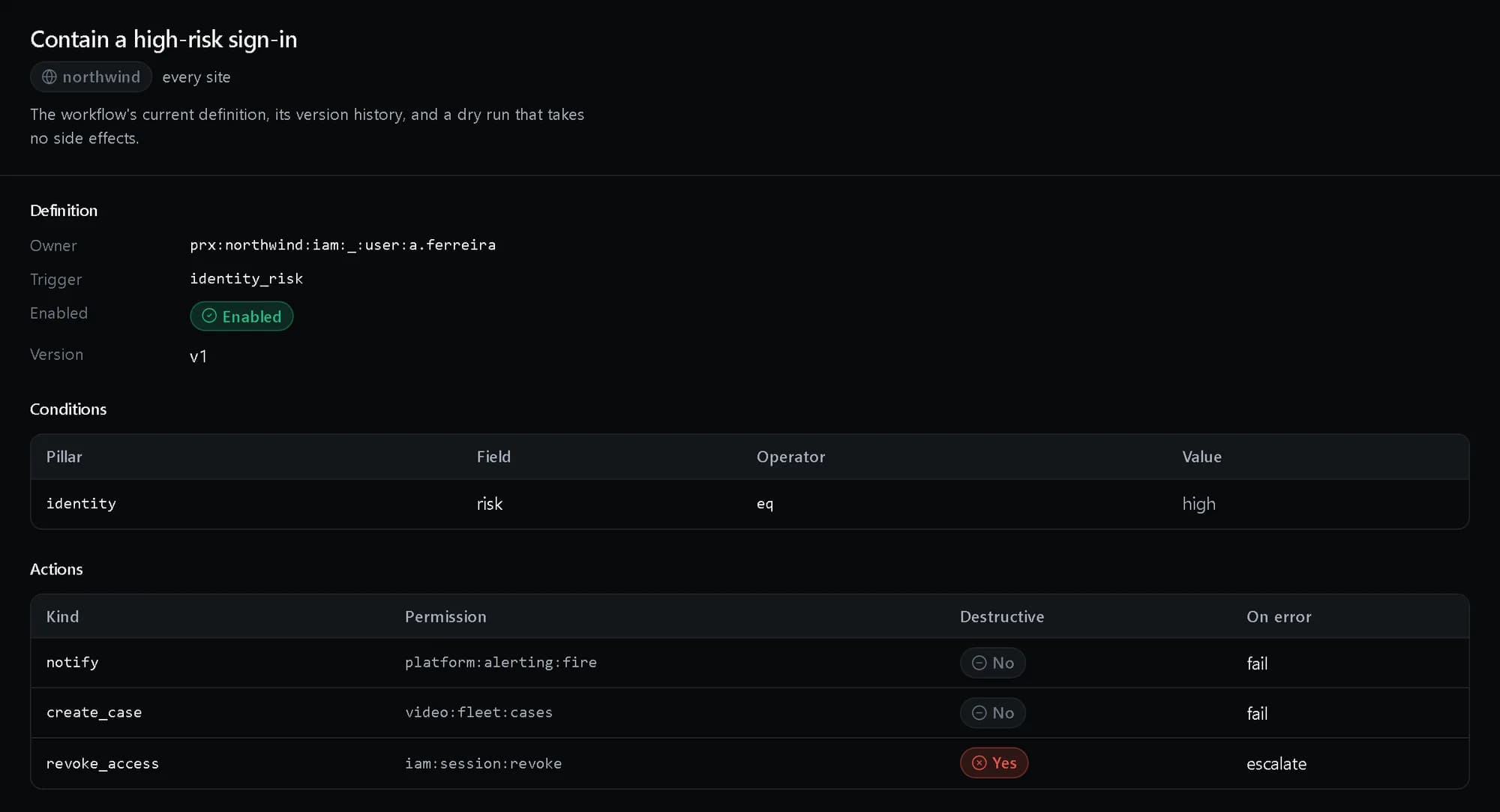
A workflow’s definition
Trigger, condition and actions, each with the permission it is authorized against.
Reference agents
Six presets, each with the permissions it needs and whether it waits for approval.


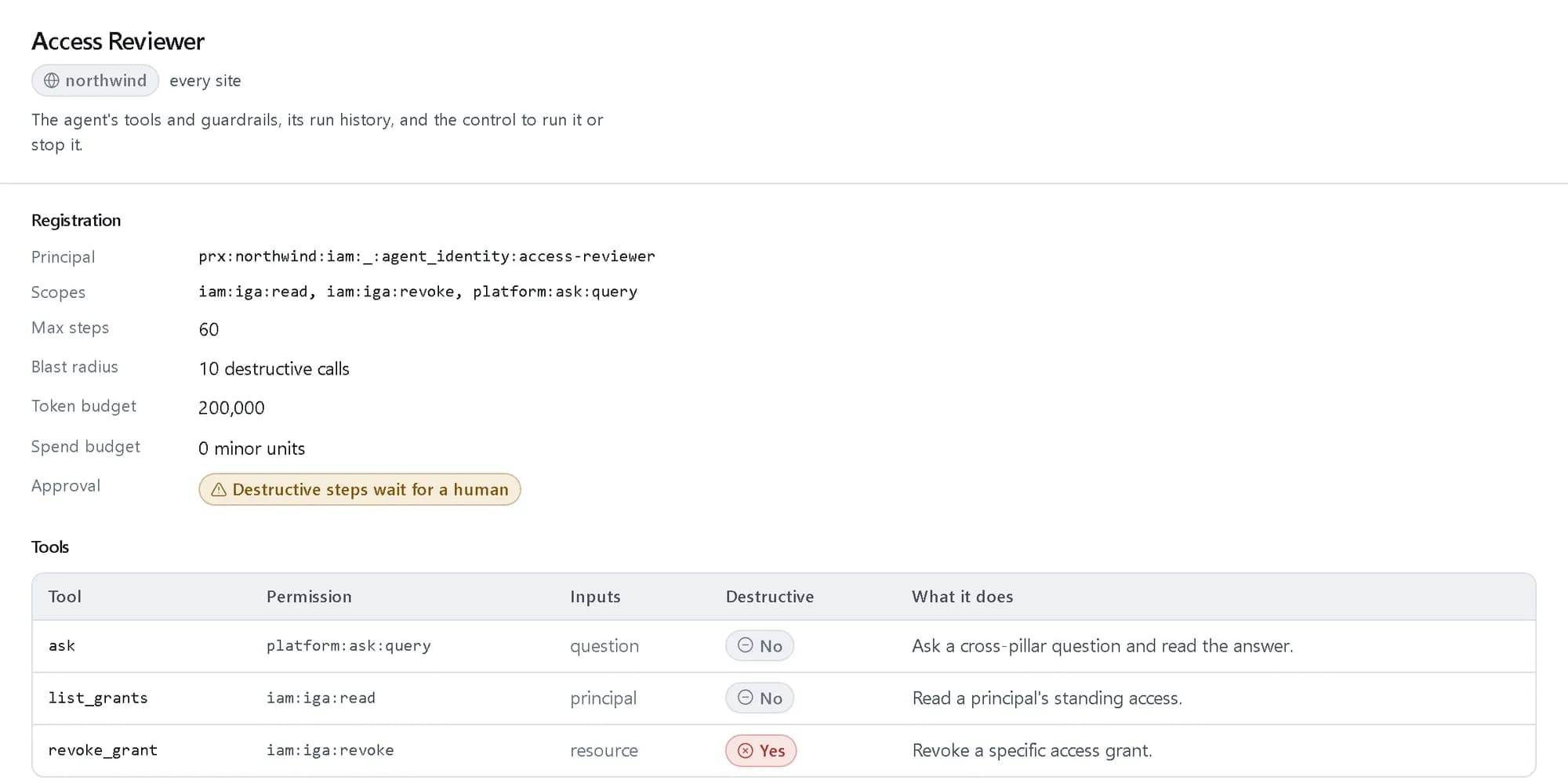
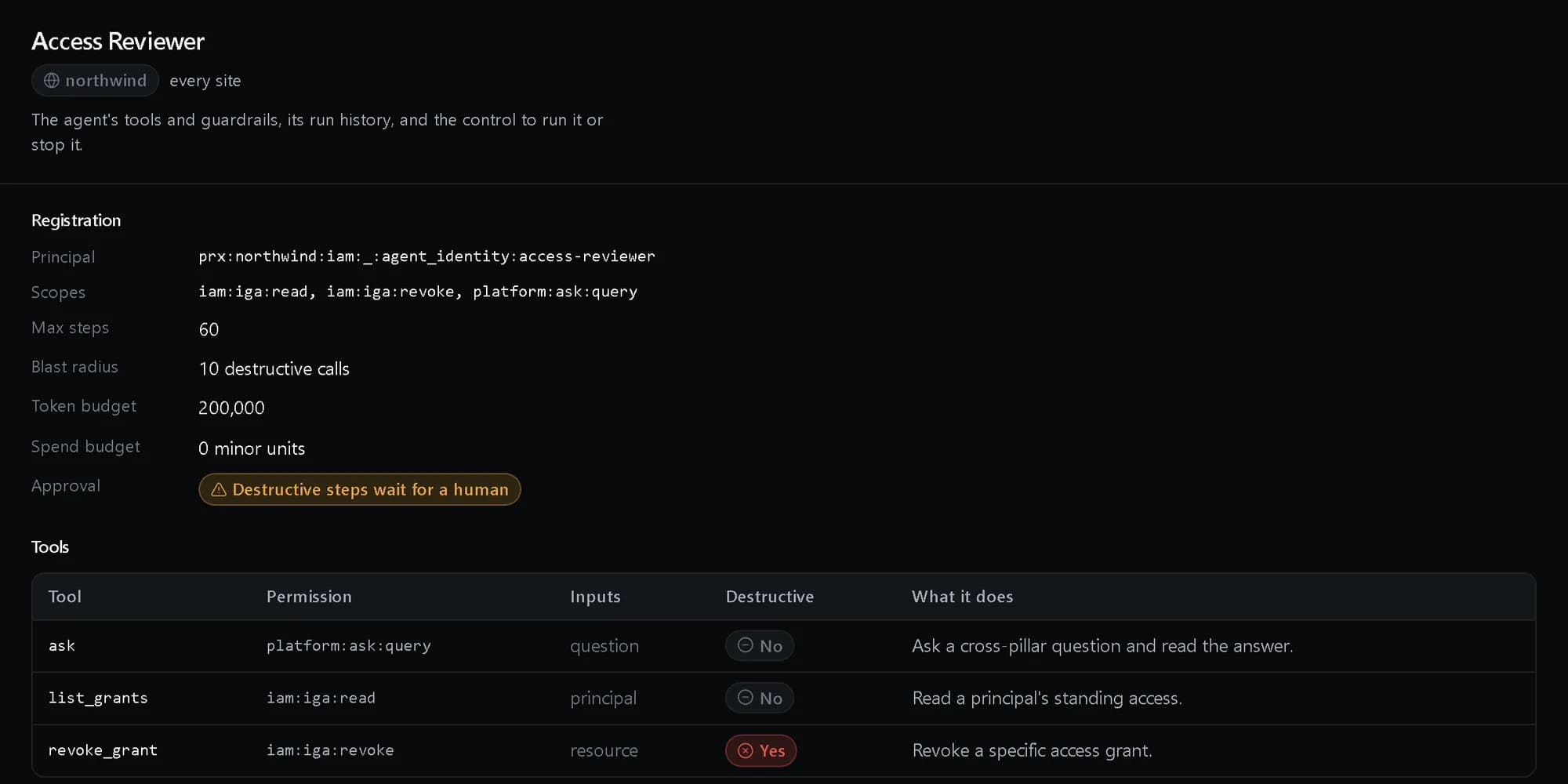
An agent’s limits
Its own principal and scopes, budgets, blast radius and tools.
How it fits together
What happens between your request and a running resource.
An event from any pillar starts a workflow, or a person starts an agent. Each step is planned, checked against the guardrails and authorized against the policy decision point as whoever started it. Allowed steps act through the pillar or the connector that owns them; destructive ones wait for a person; every step is recorded.
- An event: alert · risk · schedule · webhook (What starts it)
- A person: runs an agent (What starts it)
- Workflow: conditions · actions (The platform)
- Agent runtime: tools · budget · memory (The platform)
- Authorize each step: as whoever started it (The platform)
- Pillars: identity · cloud · video · data (What it acts on)
- Connectors: Slack · tickets · doors (What it acts on)
- An event to Workflow
- A person to Agent runtime
- Workflow to Authorize each step
- Agent runtime to Authorize each step
- Authorize each step to Pillars: allowed
- Authorize each step to Connectors: allowed
Who it is for
The teams and situations this product was built for.
Security operations
A consistent first response to a risky sign-in or a camera going dark, at any hour.
Workflows that notify, open a case and contain access, simulated before they are switched on.
IT and HR
Leavers whose data, door and cloud access all end on the same day.
An offboarding agent that revokes across four pillars in one traced run, each destructive step approved by a person.
Platform and finance teams
Idle resources found and stopped without handing a bot the keys.
A FinOps agent with a spend cap that proposes resizes and stops, and waits for approval to make them.
What it does
The core capabilities, live in the product today.
Triggers from every pillar
Schedule, data condition, video alert, identity risk, cloud anomaly, webhook or manual, with conditions written over any pillar’s data.
A workflow starts from the event that matters and checks its conditions before it does anything, so a high-risk sign-in from a finance account can be handled differently from the rest.
Actions across the platform and beyond
Notify, create a case, open a ticket, call an API, run SQL or a pipeline, provision and deprovision, revoke access, disable an account, lock a door.
Connectors reach email, SMS, push, Slack, Teams and webhooks; PagerDuty and Opsgenie; ServiceNow, Jira Service Management, Zendesk and Freshservice; door control, PA, radio and SNMP; and generic HTTP, MQTT and message queues.
Build visually or in code, versioned
Build a workflow in the console — a live diagram of trigger, conditions and actions, reordered by drag or by keyboard — or keep the same definition in code, with versions, rollback and a run history recording inputs and outputs.
The builder and the API write one structure, so a workflow made in either is the same workflow. Publishing a change makes a new version; rolling back republishes an earlier one as the next version, so the history is never rewritten.
Approvals and error handling
Human approval gates with timeout and escalation, and per-action retry, compensate or escalate when something fails.
Each action says what happens if it fails. A refused or failed step is recorded as such in the run, and the run reports what was and was not done.
Agents with their own identity
An agent is a real principal with scopes, credentials and a budget, a registry of tools each declared with a schema and a permission, and memory.
The runtime plans, calls tools, keeps short-term context and long-term memory in the lakehouse, retries and times out. Agents are versioned with staged rollout and rollback, and six reference agents install from a catalogue.
Guardrails on every run
Tool allow-lists, spend caps, rate limits, blast-radius limits on destructive actions, hard-stopped budgets and a full replayable trace.
Every reasoning step and tool call is recorded with its decision, so a run can be replayed and reviewed. A budget in tokens or currency stops the run when it is spent.
The ideas behind it
The words this page uses, explained once.
- Trigger
- What starts a workflow: a schedule, a data condition, a video alert, an identity risk, a cloud anomaly, a webhook or a person.
- Dry run
- A run that plans and authorizes every action as a real one would, and takes none of them.
- Agent identity
- The principal an agent acts as, with its own scopes, credentials and budget, separate from the person who runs it. Read more: Agent identity
- Blast radius
- The most destructive actions an agent may take in one run. One more is refused.
In depth
The detail an evaluation asks for.
Authorization per action
Approving a workflow is consent to the workflow, not permission for its actions. Each action is asked about separately, as the principal behind the run, and an agent can never exceed its own identity’s permissions.
Budgets that stop
Spend caps and rate limits apply per agent, and a token or currency budget hard-stops a run when it is spent rather than warning after the fact.
A record of every step
Workflow runs keep their inputs and outputs, and agent runs keep a replayable trace of every reasoning step and tool call with its decision.
How it works
- API
Define it
Write the trigger, conditions and actions as a definition, with what each action does on error.
- Console
Simulate it
Run it dry and read what every step would do and whether it would be allowed.
- Console
Install an agent
Pick a reference agent, give it its own principal and scopes, and set its budget.
- Console
Review the trace
Read each run step by step, and see which steps are waiting for a person.
In code
The same task in the CLI and both SDKs. Every call shown exists in the API.
prx CLI
Define a workflow and simulate it, then give an agent its own identity and run it
prx opsintel workflow create --body '{"slug":"contain-risky-sign-in","name":"Contain a high-risk sign-in","owner":"prx:northwind:iam:_:user:a.ferreira","trigger":{"type":"identity_risk","config":{"band":"high"}},"actions":[{"type":"notify","config":{"channel":"security-oncall"}},{"type":"revoke_access","config":{"resource":"prx:northwind:iam:_:session:latest"}}]}'prx opsintel workflow run contain-risky-sign-in --body '{"dry_run":true}'prx identity agent create --body '{"name":"security-analyst","acts_for":"prx:northwind:iam:_:user:a.ferreira","scopes":["platform:alerting:manage","platform:alerting:read","platform:ask:query","video:fleet:search"]}'prx opsintel agent agents-install --body '{"slug":"security-analyst","principal":"prx:northwind:iam:_:agent_identity:security-analyst","scopes":["platform:alerting:manage","platform:alerting:read","platform:ask:query","video:fleet:search"]}'prx opsintel agent run security-analyst --body '{"goal":"Summarise what is firing","plan":[{"tool":"read_alerts","inputs":{"since":"24h"}}]}'TypeScript SDK
Define a workflow and simulate it, then give an agent its own identity and run it
await client.opsintel.workflow.create({ slug: 'contain-risky-sign-in', name: 'Contain a high-risk sign-in', owner: me, trigger: { type: 'identity_risk', config: { band: 'high' } }, actions: [{ type: 'notify', config: { channel: 'security-oncall' } }, { type: 'revoke_access', config: { resource: session } }] });const { steps } = await client.opsintel.workflow.run('contain-risky-sign-in', { dry_run: true });const scopes = ['platform:alerting:manage', 'platform:alerting:read', 'platform:ask:query', 'video:fleet:search'];const identity = await client.identity.agent.create({ name: 'security-analyst', acts_for: me, scopes });await client.opsintel.agent.agentsInstall({ slug: 'security-analyst', principal: identity.urn, scopes });const run = await client.opsintel.agent.run('security-analyst', { goal: 'Summarise what is firing', plan: [{ tool: 'read_alerts', inputs: { since: '24h' } }] });Python SDK
Define a workflow and simulate it, then give an agent its own identity and run it
client.opsintel.workflow.create({"slug": "contain-risky-sign-in", "name": "Contain a high-risk sign-in", "owner": me, "trigger": {"type": "identity_risk", "config": {"band": "high"}}, "actions": [{"type": "notify", "config": {"channel": "security-oncall"}}, {"type": "revoke_access", "config": {"resource": session}}]})steps = client.opsintel.workflow.run("contain-risky-sign-in", {"dry_run": True})["steps"]scopes = ["platform:alerting:manage", "platform:alerting:read", "platform:ask:query", "video:fleet:search"]identity = client.identity.agent.create({"name": "security-analyst", "acts_for": me, "scopes": scopes})client.opsintel.agent.agents_install({"slug": "security-analyst", "principal": identity["urn"], "scopes": scopes})run = client.opsintel.agent.run("security-analyst", {"goal": "Summarise what is firing", "plan": [{"tool": "read_alerts", "inputs": {"since": "24h"}}]})The difference
The way this job usually goes, and the way it goes here.
The usual way
With ProjectX
An automation account with standing admin rights.
Every action authorized as the person or agent that started it.
Find out what a new automation does when it runs for real.
A dry run that plans and authorizes every step and changes nothing.
A bot that can delete anything it is pointed at.
Blast-radius limits, budgets and human approval on destructive steps.
Works with your tools
Every surface below drives the same product — script it, click it, or hand it to your existing tooling.
- Investigator console
- API
- prx CLI
- TypeScript SDK
- Python SDK
- Slack, Teams, PagerDuty, ServiceNow and Jira
Questions, answered
How are workflows written?
As definitions through the API, CLI and SDKs, which you can keep in version control. The console shows each workflow with its definition, dry runs, run history and versions.
What can an agent do without asking?
Only what its own scopes and its user’s permissions both allow. Destructive or high-cost actions wait for a person, and a blast-radius limit caps how many it may take in one run.
Does an agent need a language model?
No. You can give an agent its plan, or let a model-driven planner propose the tool calls; the proposals are held to the same guardrails and widen nothing.
How do we stop one?
A kill switch per agent, per tenant or globally takes effect within 5 seconds, before the agent’s next step.
How is it priced?
Workflows are billed per 1,000 executions and agents per run, at published rates in Platform Credits. A dry run is free. The rates are on the pricing page.
Products it works with
Same platform, same console, same invoice.
Start with ProjectX today.
Create a company in minutes and add this product to your invoice at the published rate.